AI sales enablement puts artificial intelligence directly into the rep’s workflow — surfacing the right content, coaching the right behavior, and flagging the right deals at the right moment — so your team closes more without working more hours. The highest-impact starting point for most B2B teams is real-time call coaching paired with contextual content surfacing: it produces measurable lift in win rate and ramp time faster than any other deployment pattern.
Start here: Run a 30-day pilot with 8–12 reps on a single call type. Set one primary KPI (win rate or ramp time) and one secondary KPI (talk ratio or objection recovery rate). Anything more complex and you will not have clean signal at the end.
Core components to expect in any mature AI sales enablement stack:
- Conversation intelligence — real-time and post-call analysis of what reps say, how prospects respond, and where deals stall
- Agentic coaching assistants — in-call prompts that surface objection responses, discovery questions, and next-step guidance without requiring the rep to break focus
- Content surfacing — AI-triggered delivery of the right case study, one-pager, or pricing sheet at the moment a prospect raises a relevant topic
- Predictive scoring and forecasting — models that rank leads by close probability and flag pipeline risk before a manager has to ask
Key Takeaways
AI sales enablement delivers the fastest, most measurable results when deployed as real-time call coaching paired with outcome-based metrics — not activity tracking.
| Point | Details |
|---|---|
| Start with a focused pilot | Run 8–12 reps on one call type for 30 days with a single primary KPI before scaling. |
| Measure revenue outcomes | Track win rate, ramp time, and cycle length — not login rates or course completions. |
| Embed AI into existing tools | Coaching that lives inside Zoom, Meet, or Teams gets used; standalone tools get abandoned. |
| Human-in-the-loop design wins | Agentic AI that suggests while managers and reps decide outperforms fully autonomous approaches. |
| Getcoachmode for live calls | CoachMode delivers real-time objection responses and post-call scoring inside your existing meeting platform. |
Table of Contents
- What AI sales enablement actually means in practice
- High-impact use cases where AI moves the revenue needle
- How AI integrates into your sales workflow
- What to measure and how to set realistic ROI expectations
- Step-by-step rollout checklist for a pilot and broader deployment
- Common implementation mistakes and how to avoid them
- Why real-time coaching moves the needle: CoachMode’s approach and a pilot recipe
- How to evaluate vendors: criteria, red flags, and a decision matrix
- Where AI sales enablement delivers fast and where it falls short
- CoachMode puts real-time coaching where it matters most: on the live call
- Sources
What AI sales enablement actually means in practice
Sales enablement has always been about getting reps the right information at the right time. The “AI” part changes when and how that happens. Traditional enablement is largely pre-call: training sessions, playbooks, content libraries. AI enablement is live and continuous — it operates during the call, after the call, and across the pipeline simultaneously.
The architecture looks like this: raw inputs (CRM data, call transcripts, content repositories, email threads) feed an AI layer that enriches and infers, then pushes outputs to the rep or manager in the form of coaching prompts, content recommendations, deal scores, and forecast signals. The rep never has to go looking for what they need; the system brings it to them.
Four components do most of the work:
- Conversation intelligence transcribes and analyzes calls in real time, flagging competitor mentions, pricing objections, and buying signals as they happen.
- Agentic assistants act on those signals — suggesting a specific response to a price objection, recommending a discovery question when the prospect mentions a pain point, or prompting a next step when the call is drifting.
- Content surfacing connects the conversation to the content library, so when a prospect asks about security compliance, the relevant case study appears on the rep’s screen without a manual search.
- Predictive scoring ranks inbound leads and existing pipeline by close probability, letting reps prioritize the deals most likely to move.
The difference from generic CRM automation is agency and timing. A CRM records what happened. AI enablement acts on what is happening — or predicts what will happen next.
High-impact use cases where AI moves the revenue needle
1. Real-time coaching and conversation intelligence
The problem: reps freeze on objections, talk too much, or miss buying signals mid-call. No manager can be on every call. Conversation intelligence solves this by listening in real time and surfacing the right response at the moment the rep needs it. The immediate benefit is confidence: reps stop winging objection responses and start delivering consistent, trained language. Outcome example: teams that deploy real-time coaching typically see measurable improvement in talk ratio and objection recovery within the first 30 days.

2. Contextual content recommendations
The problem: reps either forget to send follow-up materials or send the wrong ones. AI-driven content surfacing ties the conversation to the content library automatically. When a prospect mentions a specific use case, the system recommends the matching case study. The rep sends it in the call, not three days later. Seismic’s benchmark research connects enablement investment directly to win rate, quota attainment, and cycle length — and content relevance is one of the clearest levers.
3. Personalized outreach generation
The problem: generic outreach gets ignored. AI tools can pull CRM data, intent signals, and firmographic context to draft personalized emails and call scripts at scale. The immediate benefit is volume without sacrificing relevance. A rep who previously spent 45 minutes crafting a cold email can review and send an AI-drafted version in under five minutes.
4. Lead scoring and predictive prioritization
The problem: reps spend time on deals that will never close and ignore signals on deals that could. Predictive scoring models trained on historical win/loss data rank the pipeline by close probability. Gartner frames this as one of the clearest applications of AI to operationalize repeatable revenue processes — moving reps from gut-feel prioritization to data-driven focus.
5. AI-assisted forecasting
The problem: forecast calls are still largely based on rep optimism. AI forecasting layers signal data (email engagement, call sentiment, deal velocity) on top of CRM stage data to produce a probability-weighted pipeline view. Managers get a more honest number; reps get earlier warning when a deal is drifting. The metric that moves: forecast accuracy, which directly reduces end-of-quarter surprises.
How AI integrates into your sales workflow
Two distinct deployment patterns exist, and confusing them is one of the most common implementation mistakes.
Real-time (in-call): The AI listens to the live conversation, processes speech-to-text in near real time, and pushes prompts to the rep’s screen. Latency matters here. A prompt that arrives 15 seconds after the objection is useless. Practically, “real-time” means under 3 seconds from speech to screen. Enterprise deployment considerations — model size, inference speed, network reliability — all affect whether a vendor can actually deliver that latency at scale.
Post-call analytics: The AI processes the full transcript after the call ends, generating summaries, coaching items, talk-ratio breakdowns, and deal-risk flags. Latency is irrelevant here; depth of analysis is what matters. This is where managers get the data they need for focused coaching conversations.
The data flow for both patterns follows the same sequence:
- Capture — audio, transcript, CRM context, and content metadata are ingested
- Enrich — the AI adds speaker identification, sentiment tagging, topic classification, and deal-stage context
- Infer — models generate coaching recommendations, content matches, or risk scores
- Recommend — outputs are pushed to the rep (in-call) or manager (post-call dashboard)
- Action — the rep responds to a prompt, the manager schedules a coaching session, or the system logs the outcome back to the CRM
Integration checklist for a production deployment:
- CRM (Salesforce, HubSpot, or equivalent) for deal context and outcome logging
- Meeting platforms (Zoom, Google Meet, or Microsoft Teams) for audio capture
- Content repository (SharePoint, Highspot, or similar) for content surfacing
- Data enrichment layer (for lead scoring inputs)
Agentic, human-in-the-loop designs — where the AI suggests, the manager reviews, and the rep acts — consistently outperform fully autonomous approaches for high-ticket B2B use cases. They preserve seller judgment and reduce compliance risk.
What to measure and how to set realistic ROI expectations
The biggest measurement mistake in AI sales enablement is tracking activity instead of outcomes. Course completions, login rates, and content views are not revenue metrics. Seismic’s benchmark data recommends win rate, quota attainment, and cycle length as the core accountability measures for enablement investment — and those are the right anchors.
| KPI | How to measure | Baseline tip | What to watch for |
|---|---|---|---|
| Win rate | Closed-won / total qualified opps | Pull 90-day pre-pilot average by cohort | Even a 3–5 percentage point lift is meaningful at scale |
| Ramp time | Days from hire to first closed deal | Track by hire cohort, not role average | New hires in the AI cohort vs. control group |
| Sales cycle length | Average days from opp creation to close | Segment by deal size to avoid outlier distortion | Shortening by even one week compounds across the pipeline |
| Forecast accuracy | Predicted close vs. actual close by quarter | Establish a rolling 90-day baseline | Improvement signals better pipeline hygiene, not just AI |
| Coaching moments per rep | Prompts acted on / prompts delivered | Start tracking from day one of the pilot | Low action rate = toggle tax or irrelevant prompts |
Pro Tip: Set your baseline before you turn the tool on. Pull 90 days of historical data for your pilot cohort across all five KPIs above. Without a clean baseline, any improvement you see is anecdotal — and anecdotal evidence does not survive a budget review.
Thomson Reuters estimates that AI could free up roughly 12 hours per week for professionals by 2029. For a sales rep, that headroom translates directly into more selling time — but only if the tool reduces friction rather than adding it.
Step-by-step rollout checklist for a pilot and broader deployment
1. Audit your data and systems before anything else
CRM hygiene is the foundation. If deal stages are inconsistently used, contact records are incomplete, or call recordings are not being captured, the AI has nothing clean to work with. Spend two weeks on data cleanup before you configure a single AI feature.
2. Define roles and ownership
Assign an enablement owner who is accountable for the pilot outcomes. RevOps owns the CRM integration and data governance. IT owns access controls and security review. Frontline managers own rep adoption — they are the most important variable in whether reps actually use the tool.
3. Design the pilot with discipline
Eight to twelve reps, one call type, 30 days. Pick reps who are representative of your mid-tier performers, not your top closers (who will succeed regardless) or your bottom performers (who introduce too many confounding variables). Define success criteria before the pilot starts, not after.
4. Run a structured onboarding session
Reps need to understand what the AI does and does not do. Thirty minutes of live onboarding — showing exactly what appears on screen during a call and why — reduces resistance and increases prompt adoption rates. White-glove onboarding, where a vendor walks through personalized setup, is worth the time investment for high-ticket teams.
5. Establish a governance framework
Decide upfront: who reviews AI-generated coaching recommendations before they become official feedback? What happens when a model output is wrong or misleading? Set a human-in-the-loop approval rule for any coaching content that will be shared with reps as formal guidance. For U.S. teams, confirm that call recording and AI analysis comply with applicable state consent laws — some states require two-party consent.
6. Run weekly pilot check-ins
Review prompt adoption rates, talk-ratio trends, and any qualitative rep feedback every week. Do not wait until day 30 to find out the tool is not being used. Adjust prompts, retrain the model on your specific objection set, or simplify the interface based on what you learn in weeks one and two.
7. Scale with a documented playbook
Before you expand beyond the pilot cohort, document what worked: which prompt types drove the most rep action, which integrations were essential, and which manager behaviors correlated with higher adoption. That playbook becomes your onboarding guide for the next cohort.
Common implementation mistakes and how to avoid them
The most common failure mode is not a bad tool — it is a good tool deployed with too much friction. When reps have to switch between their CRM, their meeting platform, and a separate coaching interface during a live call, they stop using the coaching tool within two weeks. The highest-adoption designs embed coaching directly into the surface the rep already uses.
Do:
- Integrate the AI tool into Zoom, Google Meet, or Teams so it appears where the call happens
- Use post-call summaries as the starting point for manager coaching conversations, not as a replacement for them
- Let reps see their own scores and trends before managers do — self-awareness drives behavior change faster than top-down feedback
- Tie AI coaching prompts to your actual sales playbook and objection library, not generic templates
Don’t:
- Deploy five AI tools simultaneously and expect reps to adopt all of them
- Measure success by login rates or prompt impressions — those are vanity metrics
- Skip the governance step; unreviewed AI outputs can create coaching inconsistencies that damage rep trust
- Assume top performers will champion the tool — they often resist it most
Security and privacy: For U.S. deployments, confirm that your vendor stores and processes data within U.S. data centers, that call recordings are encrypted at rest and in transit, and that your vendor’s data processing agreement aligns with your company’s security policies. This is general guidance. Confirm specifics with your legal and IT teams.
Why real-time coaching moves the needle: CoachMode’s approach and a pilot recipe
Most coaching happens after the deal is already won or lost. A manager reviews a call recording, identifies what went wrong, and schedules a debrief — but the moment has passed. Real-time AI sales coaching changes that by putting the coaching inside the call itself.
Getcoachmode is built specifically for this problem. During a live call on Zoom, Google Meet, or Teams, CoachMode listens to the conversation and surfaces instant objection responses, discovery question prompts, and buying signal alerts on the rep’s screen. When a prospect says “your price is too high,” the rep does not have to improvise — CoachMode delivers a trained response in under three seconds. After the call, reps receive a scored recap covering talk ratio, objection handling, and key moments, with specific items to work on before the next call.
The toggle tax problem — reps switching between tools mid-call — is addressed by design. CoachMode runs alongside the meeting platform the rep already uses, so there is no separate window to manage and no workflow interruption.
Pilot recipe for a CoachMode deployment:
- Cohort: 8–10 high-ticket closers running discovery or closing calls
- Duration: 30 days
- Primary success metric: win rate (closed-won / qualified opportunities)
- Secondary metrics: talk ratio trend, objection recovery rate, post-call score improvement
- Manager checkpoints: weekly review of post-call scorecards; bi-weekly cohort debrief comparing pilot vs. control group metrics
- Onboarding: white-glove setup session to load your specific objection library and script into CoachMode before day one
The sales call scorecard feature gives managers a structured view of rep performance across every call in the pilot period — not just the calls they happened to sit in on.
How to evaluate vendors: criteria, red flags, and a decision matrix
Vendor selection in AI sales enablement is where most teams make their second-biggest mistake (the first is skipping the pilot). The market is large — Forrester’s market-sizing analysis puts enterprise AI software investment at roughly $37 billion by 2025 — which means there is no shortage of vendors making similar claims. Evaluation discipline matters.
Core selection criteria:
- Integration depth: Does the tool connect natively to your CRM and meeting platforms, or does it require middleware and custom development?
- Real-time capability: What is the actual latency from speech to prompt? Ask for a live demo on a real call, not a recorded walkthrough.
- Data governance: Where is data stored? Who can access call recordings? What is the data retention policy?
- Model transparency: Can the vendor explain why a specific coaching prompt was generated? Opaque models create rep distrust.
- Manager reporting: Does the platform give managers the data they need for focused coaching, or does it produce dashboards that require interpretation?
- Total cost of ownership: Include onboarding, integration work, and ongoing admin time, not just the subscription fee.
Questions to ask in every vendor demo:
- Show me a live call with a real objection — what appears on the rep’s screen and how quickly?
- How does the model handle an objection it has not seen before?
- What does the post-call report look like, and how do managers use it?
- What is your average time-to-value for a new customer in our segment?
- How do you handle state-specific call recording consent requirements?
Red flags:
- No native CRM integration (requires a third-party connector for basic data sync)
- Demo uses only pre-recorded calls — vendor will not show a live scenario
- Pricing model that charges per call or per minute (creates usage anxiety that suppresses adoption)
- No pilot support or structured onboarding included in the contract
For a simple decision matrix: score each vendor 1–5 on integration depth, real-time latency, data governance, manager reporting, and TCO. Any vendor scoring below 3 on integration or real-time capability should be eliminated regardless of their overall score.
Where AI sales enablement delivers fast and where it falls short
The fastest, most measurable returns from AI sales enablement come from three places: live-call coaching, content surfacing at the moment of need, and pipeline forecasting. These are the use cases where AI operates on structured, repeatable inputs — a call transcript, a content library, a CRM record — and produces outputs that a rep or manager can act on immediately. The feedback loop is tight, the signal is clear, and the improvement shows up in metrics within 30–60 days.
Where AI is less effective today: replacing the relationship-driven, judgment-heavy work of complex enterprise negotiations. A rep navigating a six-month, multi-stakeholder deal with competing internal champions needs political intelligence and situational judgment that no current model reliably provides. AI can surface relevant information and flag risk signals, but the strategic decisions in those deals still belong to the human.
The honest investment horizon for most B2B teams is 60–90 days to meaningful pilot data and 6–12 months to see the full compounding effect on ramp time and win rate. Teams that expect transformation in 30 days usually declare failure right before the results would have arrived.
CoachMode puts real-time coaching where it matters most: on the live call
Most AI sales tools analyze what already happened. CoachMode works while it is happening. For high-ticket sales teams running discovery and closing calls on Zoom, Google Meet, or Teams, CoachMode delivers instant objection responses, buying signal alerts, and structured discovery prompts directly on the rep’s screen — without interrupting the conversation or adding another tool to manage.
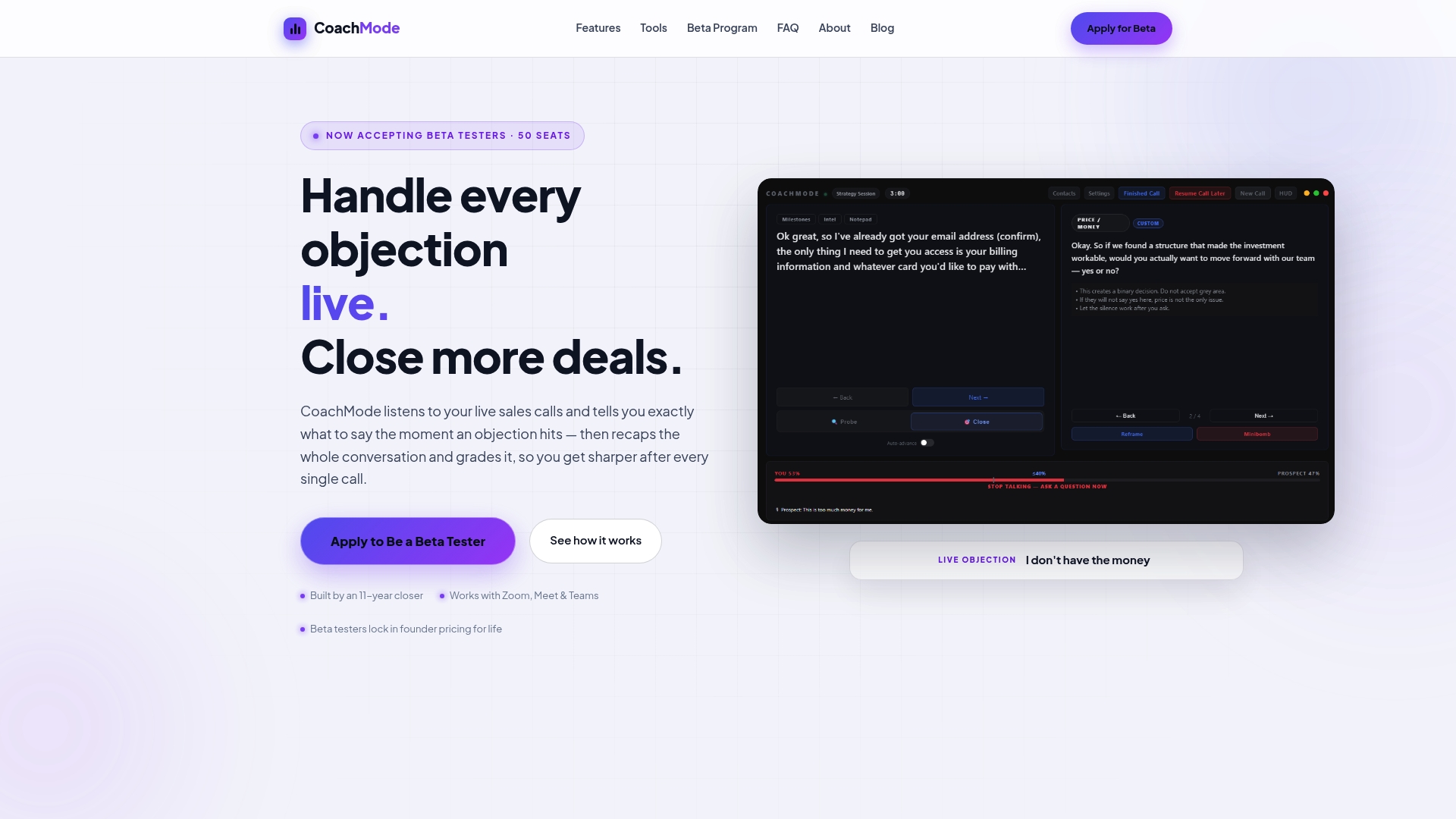
The pilot setup takes one session. Getcoachmode’s white-glove onboarding loads your specific objection library and sales script into the platform before your first call, so reps are not working with generic templates. Post-call, every rep gets a scored recap with talk ratio, objection handling grades, and specific coaching items. Managers get a structured view across the whole cohort without sitting in on every call.
If you are ready to run a focused 30-day pilot with your closing team, start with CoachMode’s live-call coaching and see the scorecard data after week one.
Sources
- AI in Sales: The Secret to Closing More Deals – Gartner
- Forrester
- AI set to save professionals 12 hours per week by 2029 (Thomson Reuters)
- Computer
- Seismic benchmark report ties enablement to win rate and quota attainment (MarketScale)