Customizable sales scripts are modular talk tracks built from swappable blocks (opener, pain question, value bridge, call to action) instead of a rigid word-for-word monologue. The fastest path to results: pick one template from this guide, run it on 20 calls, and track whether it moves more prospects to a next step than whatever you’re using now. The frameworks, channel variants, and testing plan below tell you exactly how.
TL;DR:
- Customizable sales scripts should be viewed as flexible frameworks, not fixed transcripts, allowing dynamic swapping of blocks based on the prospect and channel.
- Each script must contain four essential blocks: opener, pain question, value bridge, and call to action, with templates tailored to specific triggers and personas.
- Testing small variations on around 20 to 30 calls helps identify effective language, with script versions tracked and rolled out gradually to avoid performance drops.
- Rehearsing the meaning behind script lines and pausing after personalized openers fosters more natural conversations and reduces robotic delivery.
- Integrating scripts with CRM data and live coaching tools ensures real-time relevance and continuous improvement through feedback and data analysis.
Table of Contents
- What Makes a Sales Script “Customizable”?
- The Four-Block Structure Every Script Needs
- Channel-by-Channel Script Examples You Can Copy
- Objection Handling: The ARQ Pattern and 6 Ready Rebuttals
- How to Personalize Scripts Using CRM and Call Data
- Testing and Iterating Scripts Without Guessing
- Keeping Customized Scripts From Sounding Scripted
- Mistakes That Sink Otherwise Good Scripts
- Connecting Scripts to Your CRM and Sales Stack
- Three Habits That Keep Scripts From Becoming Shelfware
- Putting Customizable Scripts to Work in Live Calls
- Where to Learn More About Script Customization
- Sources
What Makes a Sales Script “Customizable”?
A customizable sales script is a framework, not a transcript. Each block, opener, pain question, value bridge, call to action, gets swapped based on who’s on the phone, what triggered the call, and which channel you’re using. A rigid script forces every prospect through the same words. A customizable one keeps the skeleton fixed and lets the language flex around it.
That distinction matters because rigid scripts break the moment a real conversation starts. HubSpot’s field guide makes the case that the best scripts function as flexible talk tracks guiding a human conversation, not lines to recite. Reps who memorize a script word for word tend to freeze when a prospect goes off-book, which happens on nearly every call worth having.
Three things separate a script from a talk track from a template, and sales teams mix these terms up constantly:
- Script: the full structure, blocks and sequencing included.
- Talk track: the specific language used inside one block, meant to be adapted per call.
- Template: a fill-in-the-blank starting point you edit before you ever pick up the phone.
This guide covers all three, but the practical benefit is the same regardless of label. New reps ramp faster because they’re not improvising from scratch. Qualification stays consistent because every rep asks a real pain question instead of skipping straight to a pitch. And when a script needs updating, whether that’s a new objection showing up or a positioning shift, you edit one block instead of rewriting the whole call.
Ownership matters here. Sales ops or enablement should own the master version of any script, with reps allowed to customize variables (name, trigger, proof point) but not the underlying structure. Without that split, you end up with 12 reps running 12 different scripts and no way to tell which one is actually working.
The Four-Block Structure Every Script Needs

Every effective sales script, regardless of channel, breaks into four blocks: opener, pain question, value bridge, and call to action. SyncGTM’s practical guide frames this as the backbone structure, then layers channel-specific variants and persona mapping on top. Here’s how each block works and a template you can copy today.
1. The opener (first 20 seconds)
This is the highest-leverage 20 seconds of the entire call. HubSpot’s research on scripting emphasizes rehearsing this section word for word, then loosening up for the rest of the conversation. A shaky opener gets you hung up on before the pain question ever lands.
Cold call opener template:
“Hi [Name], this is [Your Name] from [Company]. I know I’m catching you out of nowhere; I’ll be quick. I’m calling because [specific trigger, e.g., ‘I saw your team just posted three open SDR roles’], and that usually means [pain hypothesis]. Is that something you’re dealing with right now?”
2. The pain question
This block does the qualifying. Skip it and you’re pitching blind.
Discovery call opener template:
“Before I walk through anything, help me understand where things stand today. When [trigger event] happens, what does that actually look like for your team, and what’s it costing you, whether that’s time, deals, or headcount?”
3. The value bridge
This connects the stated pain to your solution without turning into a feature dump.
Demo intro template:
“Based on what you just told me about [restate pain], here’s what I want to show you: [one specific capability tied directly to that pain], and how [proof point, e.g., a stat, a comparable customer outcome] plays out for teams like yours.”
4. The call to action
Every block builds to this. Vague endings (“let me know if you have questions”) kill momentum.
Short follow-up template:
“Following up on [specific detail from last call]. I put together [asset/next step] based on what we discussed. Do you have 15 minutes Thursday or Friday to walk through it?”
To adapt any of these, run through one checklist before every call: swap the persona reference (title, seniority, department), swap the trigger (what specifically prompted this outreach), and swap the proof point (a number, case, or outcome that this exact persona would find credible). If you can’t fill in all three variables with something specific, you’re not ready to dial, you’re guessing.
Pro Tip: Write your opener as if you’re leaving a voicemail for someone who will hang up in 8 seconds. If it survives that test, it’ll survive a live pickup too.
Channel-by-Channel Script Examples You Can Copy
The four-block structure holds across every channel, but the constraints change. A phone call tolerates back-and-forth; a LinkedIn message gets skimmed in three seconds. Match the length and tone to the medium or your open rates and answer rates will tell you fast.
Phone (cold call):
- “Hi [Name], [Your Name] from [Company]. Thirty seconds. I noticed [trigger] and figured it might connect to [pain]. Fair to ask if that’s on your radar?”
- “Hey [Name], quick one. Most [role] I talk to are dealing with [pain] right now. Curious if that’s true for you or if I’ve got the wrong read.”
Voicemail (15–20 seconds, no more):
- “Hi [Name], [Your Name] with [Company]. Reason for the call: [trigger], and it usually means [pain]. I’ll send a follow-up email, but if you want to skip straight to a conversation, my number is [number].”
- “Hey [Name], quick voicemail. I work with [persona type] on [pain]. Left you a note over email with more detail. No pressure, just wanted to put a voice to the name.”
Email (short, scannable, one ask):
- Subject: “Quick question about [specific trigger]”
Body: “Hi [Name], noticed [trigger]. Most teams in that spot are seeing [pain]. Worth 15 minutes to see if [specific outcome] applies to you too?” - Subject: “[Mutual connection/context] mentioned you”
Body: “Hi [Name], [context]. I help [persona] solve [pain] without [common tradeoff]. Open to a short call this week?”
LinkedIn (conversational, no pitch in the first message):
- “Hi [Name], saw [specific detail from their profile/activity]. Curious how your team is handling [pain] these days, always interested in how [role]s are approaching it.”
- “Hey [Name], following up on [shared context]. Would love to hear your take on [pain point] if you have a minute.”
Switch channels when one goes cold, not when you feel impatient. A rep who cold calls, gets voicemail, and emails the same day gives the prospect three low-friction ways to respond instead of one high-pressure one. A short transition line helps: “I left you a voicemail earlier and wanted to follow up here in case email’s easier.”
Objection Handling: The ARQ Pattern and 6 Ready Rebuttals
Objections aren’t a sign the call is over. They’re a sign the prospect is actually engaging. The pattern that works across almost every objection type is Acknowledge, Reframe, Question (ARQ): validate what they said, shift the frame without arguing, then ask a question that moves the conversation forward.
Here are six rebuttals built on that pattern, ready to drop straight into your script or adapt live on a call:
- Price: “Totally fair; budget matters. A lot of teams find the cost of staying with [status quo] is actually higher once you factor in [specific cost]. What would this need to look like to make sense for your budget?”
- Timing (“not right now”): “Makes sense, timing’s everything. Out of curiosity, what needs to happen before this moves up the priority list? I’d rather plan around that than push now.”
- Vendor lock (“we’re happy with our current tool”): “Good, that means the bar’s already set high. What’s the one thing your current setup doesn’t do that you wish it did?”
- No perceived need: “I hear that a lot from teams before they realize [specific pain] was costing them [specific cost]. Has [trigger event] come up for you at all?”
- Decision-maker absent: “Appreciate you being upfront. Who else typically weighs in on a decision like this, and would it help if I sent something you could forward along?”
- ROI uncertainty: “That’s the right question to ask before committing to anything. What result would need to show up in the first 90 days for this to feel worth it?”
Build these into the script flow right after the value bridge, not as a separate appendix reps have to hunt for. The moment an objection lands, the rep should already know which block to pull from instead of stalling.
Pro Tip: Write your objection responses as questions, not statements. A statement invites debate; a question keeps the prospect talking, and the person talking is usually the person buying themselves in.
How to Personalize Scripts Using CRM and Call Data
Generic scripts guess. Data-driven scripts know. The gap between the two is usually whatever signal you’re not yet pulling into your script selection process.
Start with intent and firmographic signals already sitting in your CRM. Forrester’s research on buying signals shows that agile messaging built around real buyer signals reignites stalled revenue conversations far more effectively than generic outreach. If a prospect just visited your pricing page, downloaded a competitor comparison, or had a leadership change, that’s the trigger your opener should reference, not a generic industry statistic.
From there, mine your own top performers. Pull transcripts from your best closers and note the exact phrasing they use when a prospect pushes back on price or stalls on next steps. BizAI’s guide to customizing AI sales scripts points to this as one of the fastest ways to raise conversion: extracting repeatable language from proven calls and turning it into branching script logic anyone on the team can use.
A workflow that ties this together in practice:
- Pull the persona and trigger from CRM before the call, not during it.
- Select the script variant that matches both.
- Rehearse the opener, then let the call breathe once discovery starts.
- Use a live coaching layer, tools like CoachMode fall into this category, to surface the right objection rebuttal in real time if the conversation drifts off-script.
- Log the outcome and feed it back into the transcript library for the next round of refinement.
Gartner’s mapping of the sales development technology stack places AI-enabled coaching tools squarely inside modern sales workflows, not as a novelty layered on top. Teams that treat script personalization and live coaching as the same system, rather than two disconnected tools, tend to close the gap between what the script says and what the rep actually does under pressure.
Testing and Iterating Scripts Without Guessing
A script you never test is a script you’re guessing about. The fix is a short, repeatable testing loop that catches bad changes before they hit your whole pipeline.
- Sandbox first. Role-play the new version internally, rep to rep or rep to manager, before it touches a real prospect. This catches awkward phrasing and dead-end questions cheaply.
- Run a small A/B test. SyncGTM recommends testing on roughly 20 to 30 calls per variant before drawing conclusions; a smaller sample can still show clear direction within a week if the difference is real, according to Forrester’s work on agile messaging cycles.
- Track the right KPIs. Call-to-meeting rate, meeting-to-opportunity rate, talk ratio, and qualified lead rate matter more than call volume or raw talk time.
- Version everything. Name each script variant (v1, v2, v2.1) so you know exactly which language produced which result.
- Roll out in stages. Small cohort first, monitor for a week, then expand to the full team once the numbers hold up.
If qualified lead rate drops meaningfully during rollout, roll back immediately rather than waiting out the week. A script that’s quietly losing you deals doesn’t announce itself; the pipeline just gets quieter.
Keeping Customized Scripts From Sounding Scripted
The irony of script customization is that a badly personalized script sounds worse than a generic one. Prospects notice when “I saw you just raised a Series B” gets recited in the same flat tone as everything else on the call.
The fix starts with how reps rehearse, not what they memorize. Practice the meaning of each line, not the exact wording, so the phrasing can shift naturally depending on how the prospect responds. A rep who’s internalized the pain question behind “what’s that costing you” can ask it five different ways and still hit the same target.
Silence helps more than most reps think. After a personalized opener lands, pause. Let the prospect respond instead of steamrolling into the next scripted line. That pause is often what separates a natural conversation from an obvious script read.
Watch for these tells that a script has slipped into robotic territory: reciting the prospect’s company name too many times, stacking two proof points back to back instead of letting one land, and moving to the next block before the prospect has actually answered the question. Any one of these breaks the illusion that this is a real conversation and not a recitation.
Finally, build in permission to deviate. If a prospect says something the script didn’t anticipate, the rep should feel free to set the script aside for thirty seconds and actually respond to what was just said. Scripts exist to support the conversation, not replace it.
Mistakes That Sink Otherwise Good Scripts
Most script failures aren’t about bad writing. They’re about how the script gets managed after it’s written.
The most common mistake: treating the script as finished the day it launches. Buyer language shifts, objections evolve, and a script frozen in time slowly drifts out of relevance. Pair that with never testing changes before rolling them out company-wide, one bad edit can quietly tank qualified lead rate for weeks before anyone notices.
Another frequent error is writing one script for every persona. A VP of sales and a frontline rep don’t share the same pain points, and a script that doesn’t branch by role reads as generic to both. Related to that: skipping the pain question entirely and jumping straight into a pitch. It feels faster, but it usually means the rep is guessing at relevance instead of confirming it.
Overloading the opener is another trap. Cramming three proof points and a company history into the first 20 seconds buries the one line that actually mattered. And teams that let every rep freelance their own version of the script lose the ability to tell which language is actually working, since there’s no consistent baseline to compare against.
Last, and easy to overlook: no version control. Without named versions and a rollback plan, a bad edit gets stuck in production because nobody can identify what changed or when.
Connecting Scripts to Your CRM and Sales Stack
A script that lives in a document nobody opens during the call isn’t a working script, it’s a reference file. The goal is getting the right variant in front of the rep at the moment they need it, pulled automatically from the data already sitting in your systems.
Start by mapping script variants to CRM fields you already track: lead source, persona or title, deal stage, and any intent signal your marketing automation platform surfaces, similar to how A Wedding Proposal Workflow That Turns Leads Into Signed Contracts shows structured workflows improving conversion. When a rep opens a record, the CRM should be able to suggest which script variant fits, rather than the rep guessing based on memory.
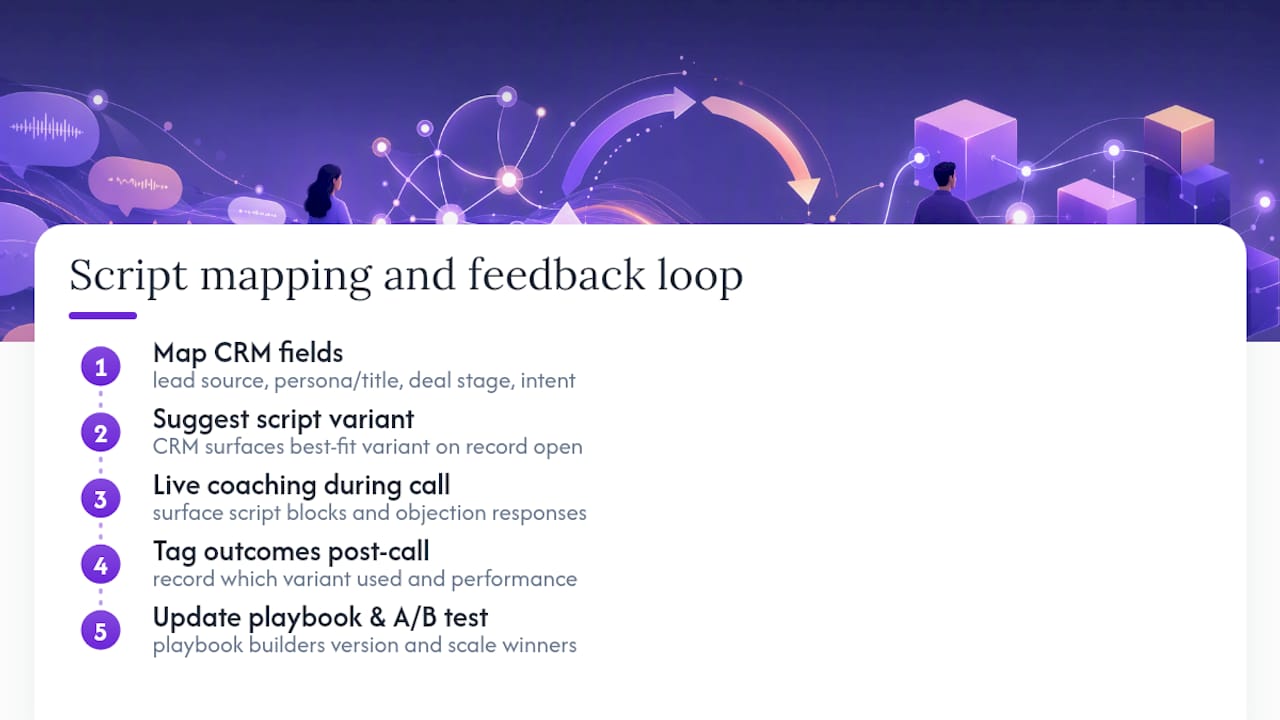
Call recording and transcription tools close the loop on the other end. Feeding call outcomes back into your CRM lets you tag which script version was used and how the call performed, which is what makes A/B testing possible at scale instead of anecdotal. Playbook builders that standardize this process, turning winning rep behavior into structured modules with version history, cut down the manual work of keeping scripts current.
Live coaching tools sit in the middle of this stack, surfacing the right script block or objection response in real time based on what’s actually said on the call, then feeding a post-call grade back into the same system. That closes the loop from script to CRM to coaching to data, which is the difference between a script library that grows stale and one that keeps improving itself every week.
Three Habits That Keep Scripts From Becoming Shelfware
Most scripts die a slow death in a shared drive nobody opens after week two. The teams that avoid that fate share three habits, and none of them are complicated.
First, weekly script hygiene. Someone, usually sales ops, reviews which variants are actually converting and prunes the ones that aren’t, rather than letting a script library grow indefinitely with dead branches nobody’s used in months.
Second, rehearsal that focuses on the first 20 seconds and the micro-commitments, not the whole call. Reps who nail the opener and know how to ask for a small yes (“worth 15 minutes?”) outperform reps who memorize an entire monologue and freeze the moment a prospect deviates from it.
Third, let the data decide, fast. If a script variant isn’t producing qualified meetings after 20 to 30 calls, cut it. Sentimental attachment to a clever line that isn’t converting is the single most common reason bad scripts survive longer than they should.
None of this requires a big process overhaul. It requires someone actually looking at the numbers every week and being willing to kill what isn’t working.
— Ryan
Putting Customizable Scripts to Work in Live Calls
Templates and testing plans get you most of the way there, but the hardest moment in any sales call is still the live one, when a prospect throws an objection you didn’t rehearse and the script in your head goes blank. That’s the gap CoachMode is built to close. It listens to the live call and surfaces the right objection response or next step in real time, so reps aren’t stuck freelancing under pressure.
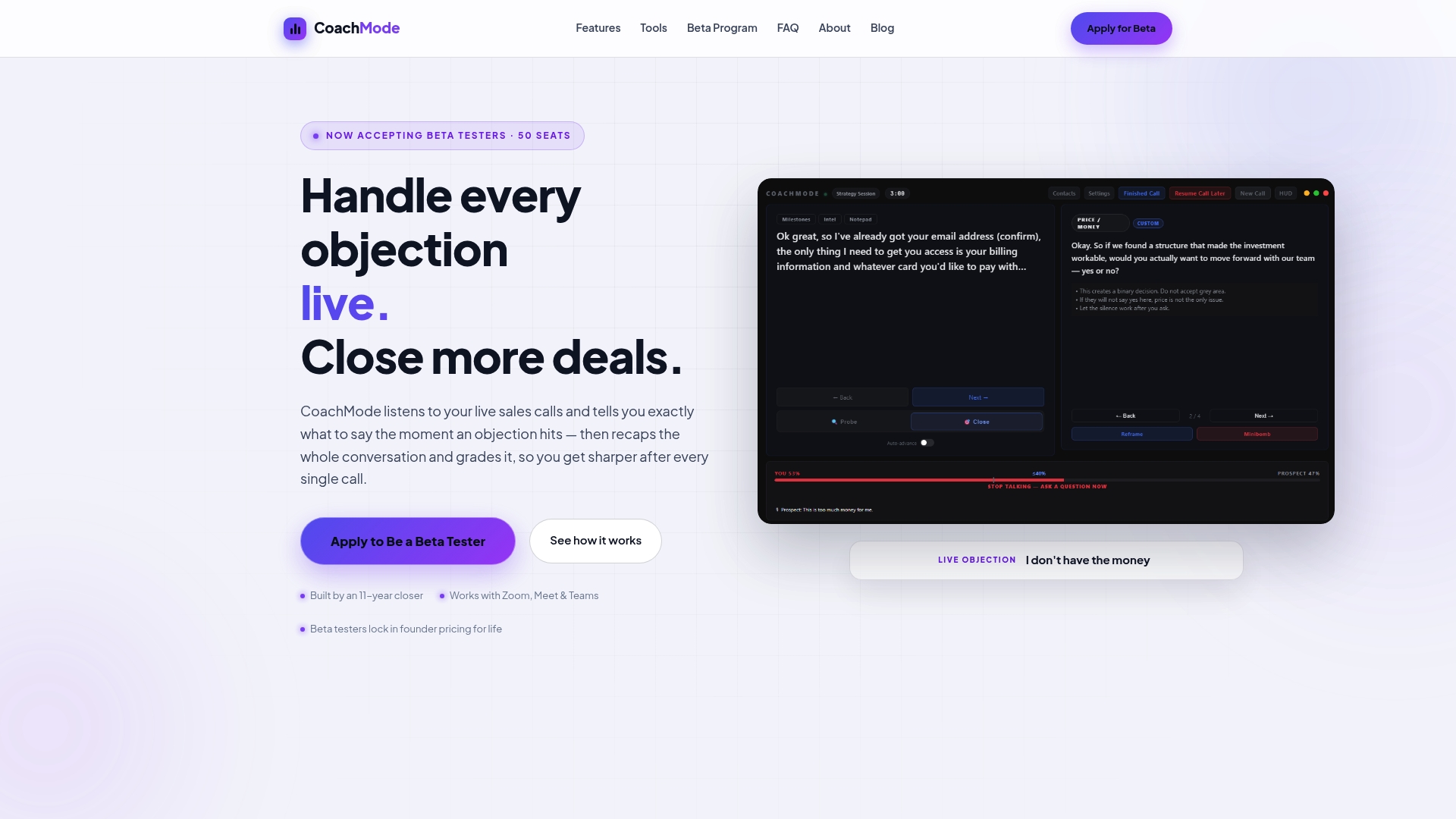
In practice, the workflow looks like this: pick a template from this guide, rehearse the opener with your team, then let CoachMode’s live sales coaching handle the moments where the conversation drifts off-script, flagging the right rebuttal from your objection library the moment a prospect brings up price or timing. After the call, CoachMode’s scorecard grades performance so you know which script variant and which responses are actually moving deals forward, not just which ones felt smooth in the moment.
If you’re already running the templates above, the next step is straightforward: try CoachMode on your next live call and see which objection responses your team is missing without it.
Where to Learn More About Script Customization
- Forrester’s research on buying signals explains how intent data sharpens outreach relevance.
- Gartner’s overview of the sales development stack covers where AI coaching tools fit alongside traditional sales tech.
- HubSpot’s sales script examples offer additional templates across industries and call types.
- noCRM’s free script generator is a quick way to draft a first version before customizing it further.
- CoachMode’s free sales tools include templates and resources built for live-call adaptation.
Sources
- Buying signals help B2B organizations reignite revenue interactions | Forrester
- Sales development technology: the stack emerges | Gartner
- Sales scripts examples (HubSpot blog)
- How to develop a sales script: a practical guide | SyncGTM
- How to customize AI sales agents scripts | BizAI