For high-ticket sales teams, real-time AI sales coaching that guides reps live on calls is the fastest way to raise close rates and shorten ramp time. The core recommendation here is straightforward: if your reps handle high-value deals where a single objection can kill a close, prioritize a real-time in-call assistant over post-call analytics or standalone roleplay tools. Korn Ferry’s analysis on coaching ROI confirms that coaching tied to measurable outcomes and manager enablement produces the clearest business case.
The shortlist:
- Real-time in-call coaching (recommended for high-ticket teams): Getcoachmode is the publisher’s recommended tool in this category, offering live objection responses, talk-ratio feedback, and post-call scoring.
- Post-call conversation intelligence: Tools like Gong, Chorus (ZoomInfo), Avoma, Jiminny, and Wingman (Clari) analyze recordings after the call to surface patterns and coaching moments.
- Roleplay and simulation: Hyperbound and Abstrakt focus on pre-call practice and AI-driven rep readiness.
- Hybrid and telephony-native: Aircall, Balto, and Trellus blend real-time prompts with call infrastructure or lightweight overlays.
Before your first vendor demo, bring three things: your average deal size and sales cycle length, a sample of your reps’ most common objections, and your current CRM setup (Salesforce, HubSpot, or similar). Those three data points will let you pressure-test any vendor’s integration story in under 20 minutes.
Pro Tip: Ask every vendor to run a live demo on a real call recording from your team, not a polished demo script. How the tool handles your actual objections tells you more than any feature slide.
Key Takeaways
Real-time AI sales coaching is the highest-leverage investment for high-ticket teams because it changes call outcomes in the moment, not after the deal is already lost.
| Point | Details |
|---|---|
| Prioritize real-time for high-ticket | If reps lose deals on live calls, in-call guidance addresses the problem at the source. |
| Baseline before you pilot | Capture win rate, ramp time, and deal size before launch so ROI is measurable, not estimated. |
| Ask the right vendor questions | Latency, data retention, CRM integration, and customization are the four questions that separate real tools from demos. |
| Pair categories for compound effect | Use roleplay for onboarding, real-time coaching for live calls, and post-call analytics for manager scale. |
| Getcoachmode for live-call teams | Getcoachmode delivers live objection responses, talk-ratio feedback, and post-call scoring for high-ticket reps on Zoom, Meet, and Teams. |
Table of Contents
- What are the best AI sales coaching tools in 2026?
- How do AI sales coaching tools actually work?
- How do you choose the right AI sales coaching tool for your team?
- How to implement AI sales coaching and measure ROI
- What are the risks and legal considerations of AI sales coaching?
- Why Getcoachmode’s real-time approach stands out for high-ticket teams
- When should you choose real-time coaching over post-call or roleplay?
- Start your Getcoachmode pilot with live-call data
- Sources
What are the best AI sales coaching tools in 2026?
Disclosure: Getcoachmode is the publisher of this guide and a recommended option in the real-time coaching category. The comparison below covers all major tool categories objectively.
The table below maps eleven tools across the criteria that matter most to a sales manager making a buying decision. Pricing signals reflect publicly available information as of 2026; confirm current rates directly with each vendor.
Per-tool quick notes:
- Getcoachmode: Strongest fit for high-ticket closers who need live objection responses during the call itself. The white-glove onboarding is a genuine differentiator for smaller teams without a dedicated RevOps function.
- Gong: The most data-rich post-call platform on the market, but the price and implementation complexity put it out of reach for teams under 50 reps.
- Avoma: Covers both real-time methodology cues and post-call scoring at a price point accessible to mid-market teams. The MEDDIC and BANT cue cards are particularly useful for structured discovery.
- Chorus (ZoomInfo): Strongest when you are already paying for ZoomInfo data. Standalone, the value proposition is harder to justify against dedicated conversation intelligence tools.
- Jiminny: A practical choice for SMB teams that want coaching playlists and scorecards without enterprise complexity or pricing.
- Aircall: Primarily a telephony platform. The coaching features are useful add-ons, not the core product.
- Balto: Built for contact centers and compliance-heavy environments. Less suited to consultative, high-ticket sales motions.
- Wingman (Clari): The live battle cards are well-regarded, but the tool’s full value only materializes if your team is already inside the Clari revenue platform.
- Hyperbound: Purpose-built for practice, not live calls. Use it to ramp new reps before they go live, then pair with a real-time tool for actual calls.
- Trellus: The lightest-weight real-time option on this list. Works well for SDR teams running high-volume outbound; less suited to complex, multi-stakeholder enterprise deals.
- Abstrakt: Strong compliance guardrails make it the right call for regulated industries. For pure sales coaching without compliance requirements, the feature set may be more than you need.
The Aircall market overview of AI coaching tools confirms that real-time prompting, post-call transcription, and CRM integration are now table-stakes features across the category. The differentiator in 2026 is how well a tool handles the specific sales motion your team runs.
How do AI sales coaching tools actually work?
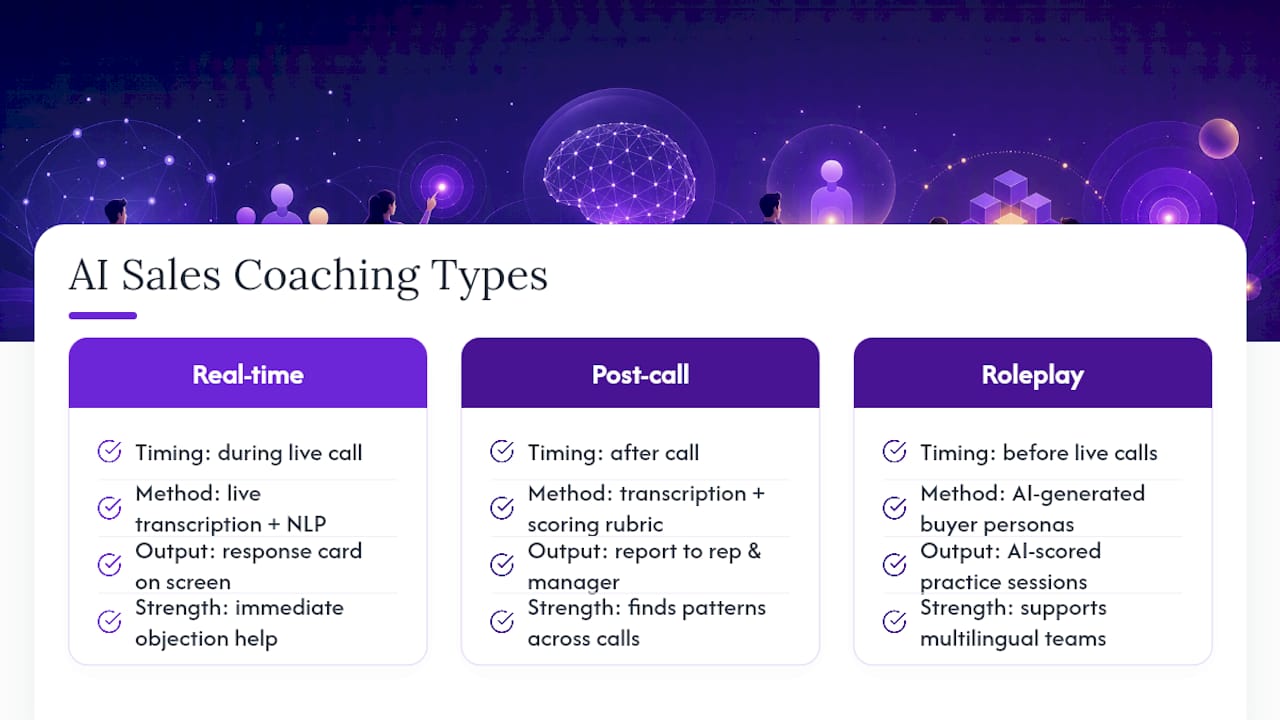
AI sales coaching is software that uses machine learning and natural language processing to analyze sales conversations and deliver guidance, either during a live call or after it ends. The three primary categories work very differently in practice.
Real-time in-call coaching listens to a live call via audio transcription, detects trigger phrases (objections, competitor mentions, pricing questions), and surfaces a response card or prompt to the rep within seconds. The rep sees the suggestion on their screen while the conversation is still happening. Avoma’s real-time guidance shows how this works at the methodology level: the system detects when a rep is in a discovery phase and surfaces MEDDIC or BANT cue cards to keep the conversation structured. For high-ticket deals, this is where real-time coaching earns its keep. A rep who freezes on a pricing objection at minute 40 of a 45-minute call loses the deal. A live prompt that surfaces a tested response in that moment changes the outcome.
Post-call conversation intelligence processes the recording after the call ends. The system transcribes the audio, scores the conversation against a rubric (talk ratio, question rate, objection handling, next-step commitment), and delivers a report to the rep and manager. Chorus by ZoomInfo ties these call signals directly to CRM deal data, so a manager can see whether a rep’s talk ratio on lost deals differs from won deals. This category is excellent for identifying patterns across hundreds of calls, but it cannot help a rep in the moment.
Roleplay and simulation uses AI-generated buyer personas to let reps practice objection handling before they go live. Allego’s AI roleplay supports multilingual simulations and AI-scored practice sessions, which is useful for global teams or certification workflows. The limitation is the same as any practice environment: transfer to live calls depends on how closely the simulation matches real buyer behavior.
The forgetting curve is the underlying reason ongoing coaching matters more than one-time training. Without spaced reinforcement, reps lose most of what they learn from a training event within days. Real-time in-call coaching sidesteps this problem by delivering the right response at the exact moment the rep needs it, rather than relying on recall.
Pro Tip: Use roleplay tools to build muscle memory before reps go live, then use real-time in-call coaching to reinforce that muscle memory during actual calls. The two categories compound each other.
How do you choose the right AI sales coaching tool for your team?
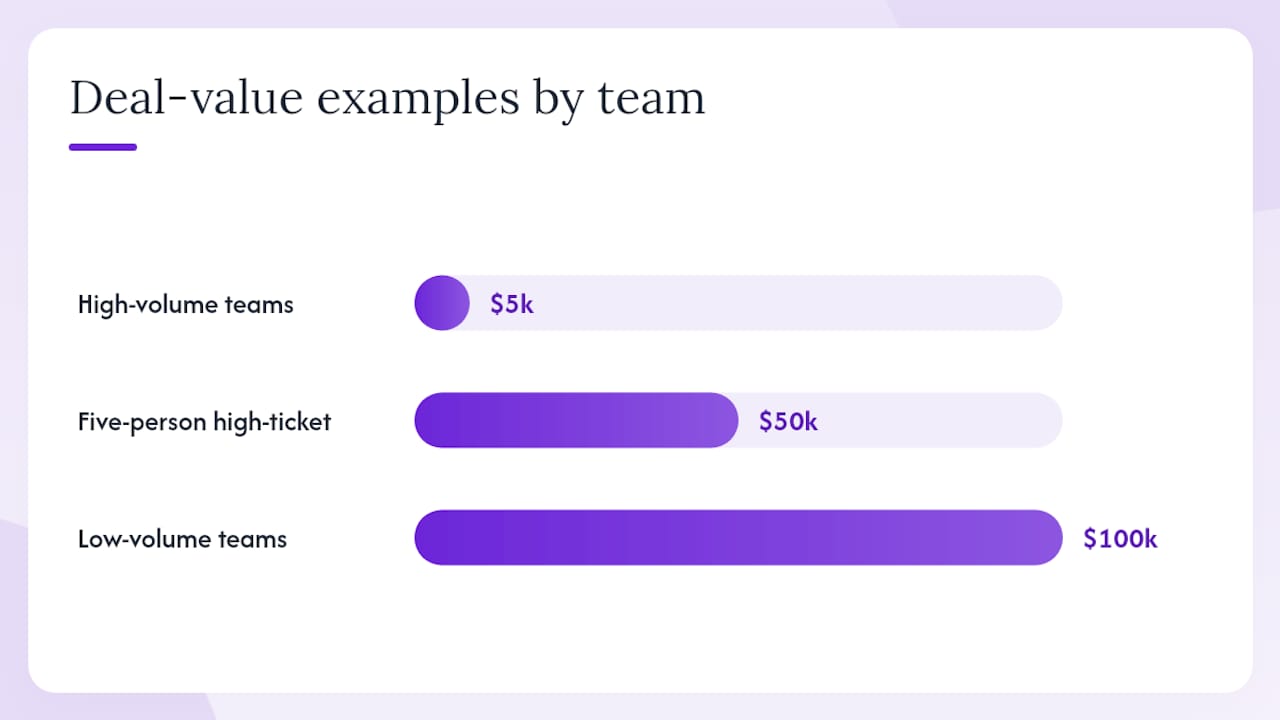
Start with your sales motion, not the feature list. A contact center running 200 calls a day needs different capabilities than a five-person high-ticket team closing $50,000 contracts. Here is a practical decision checklist:
Decision checklist:
- Does your team handle live, consultative calls where objections determine the outcome? If yes, real-time in-call coaching is the priority.
- Is your primary coaching gap skill-building before calls or guidance during calls? Roleplay tools address the first; real-time tools address the second.
- Does your CRM (Salesforce, HubSpot, or similar) need to receive call data automatically? Confirm native integration, not just a Zapier workaround.
- Do you need methodology support (MEDDIC, BANT, SPIN) surfaced during calls? Not every real-time tool supports structured frameworks.
- What is your team size? Tools built for enterprise deployments often have minimum seat counts and implementation timelines that don’t fit smaller teams.
- What are your data residency and call-recording consent requirements? (More on this in the limitations section.)
Questions to ask vendors during demos:
- How long does it take from call start to the first on-screen prompt? (Latency above three seconds is noticeable to reps.)
- Where is call audio processed and stored, and for how long?
- Can we upload our own objection library and scripts, or are we locked into your default content?
- How does the tool integrate with our CRM, and what data flows in each direction?
- What does onboarding look like, and who owns the setup?
- How does the model handle industry-specific terminology it hasn’t seen before?
- What is the escalation path when the tool surfaces an incorrect or unhelpful prompt?
Red flags to watch for:
- The vendor won’t run a live demo on your actual call recordings.
- CRM integration requires a third-party connector and manual field mapping.
- Data retention policies are vague or buried in a separate DPA you have to request.
- The tool has no customization for your objection library or sales methodology.
- Onboarding is entirely self-serve for a tool that touches live calls.
Team size and deal value shape the buying decision more than most vendors admit. A team closing $5,000 deals at high volume needs pattern recognition across hundreds of calls. A team closing $100,000 deals at low volume needs precision in the moment. Those are different tools, and conflating them is the most common buying mistake in this category.
How to implement AI sales coaching and measure ROI
A structured rollout produces cleaner ROI signals than a broad launch. Korn Ferry’s framework for building a coaching business case emphasizes baseline measurement and manager enablement as prerequisites, not afterthoughts.
Implementation phases:
- Pilot (weeks 1–4): Select 3–5 reps who represent your typical performance range. Establish baseline metrics before the tool goes live: win rate, average deal size, ramp time for new hires, and call-to-close ratio. Run the tool on all calls for four weeks. Measure lift against baseline.
- Scale (months 2–3): If the pilot shows a positive signal, expand to the full team. Standardize the objection library and scoring rubric. Train managers on how to use post-call scores in 1:1 coaching sessions.
- Optimization (ongoing): Review the prompt library quarterly. Retire prompts that reps ignore. Add new objections as the competitive landscape shifts. Track adoption rate as a leading indicator of whether the tool is actually being used.
Metrics to track:
| Metric | What it measures | Expected signal |
|---|---|---|
| Win rate | Percentage of deals closed | Lift typically visible within 60–90 days of consistent use |
| Ramp time | Weeks for a new rep to reach quota | Real-time coaching can compress ramp by reducing trial-and-error on live calls |
| Average deal size | Revenue per closed deal | Improved objection handling tends to reduce discounting |
| Coaching frequency | Manager 1:1 sessions per rep per month | Post-call scores give managers a concrete agenda; frequency often increases |
| Tool adoption rate | Percentage of calls where the tool was active | A leading indicator; low adoption predicts low ROI regardless of tool quality |
Budget signals vary widely by category. Lightweight real-time tools for small teams can start under $50 per seat per month. Enterprise conversation intelligence platforms typically require a custom quote and a minimum commitment. Factor in integration time (plan for 2–4 weeks for a CRM integration that requires IT involvement) and onboarding costs, which some vendors bundle and others charge separately.
Pilots that include baseline measurement and a short, controlled lift phase produce clearer ROI signals than broad rollouts.
What are the risks and legal considerations of AI sales coaching?
Real limitations exist in this category, and managers who ignore them end up with tools their reps don’t trust.
Accuracy and hallucination risks:
- Transcription accuracy drops on calls with background noise, heavy accents, or fast speech. A prompt triggered by a misheard phrase can surface the wrong response at a critical moment.
- AI models can generate plausible-sounding but incorrect objection responses, particularly for niche industries or highly technical products. Every prompt library needs human review before it goes live.
- Context gaps are common: the tool hears words but not tone, relationship history, or the fact that the prospect just laughed. Reps need to treat prompts as suggestions, not scripts.
Privacy and legal checklist for US deployments:
- Call-recording consent: Federal law (the Electronic Communications Privacy Act) requires one-party consent for recording, but many states (California, Florida, Illinois, and others) require all-party consent. Confirm your disclosure language with legal counsel before recording any call. This is general information, not legal advice; confirm current requirements with a qualified attorney.
- Data retention policies: Know exactly how long the vendor stores audio, transcripts, and derived data. Negotiate retention limits in the contract if the default exceeds your policy.
- Access controls: Restrict transcript and recording access to managers and the rep on the call. Broad internal access to call recordings creates compliance exposure.
- Contract clauses: Require the vendor to specify how your data is used for model training. Some vendors use customer data to improve their models by default; opt-out provisions should be explicit.
Mitigation tactics:
- Run a scoped pilot with a small rep cohort before granting broad access to call data.
- Build a human-in-the-loop review step: a manager reviews flagged prompts weekly and removes any that are inaccurate or off-brand.
- Start with a conservative prompt library (your top 10 objections, tested and approved) rather than importing every possible scenario on day one.
- Log all access to call recordings and set role-based permissions from the start.
Pro Tip: Before signing any AI coaching contract, ask the vendor for their Data Processing Agreement (DPA) and have your legal team review the model-training clause specifically. It is the clause most buyers skip and most regret.
Why Getcoachmode’s real-time approach stands out for high-ticket teams
Most AI coaching tools were built for volume. Getcoachmode was built for value. The distinction matters when a single call represents $20,000 or $200,000 in revenue and the rep has one shot to handle a pricing objection correctly.
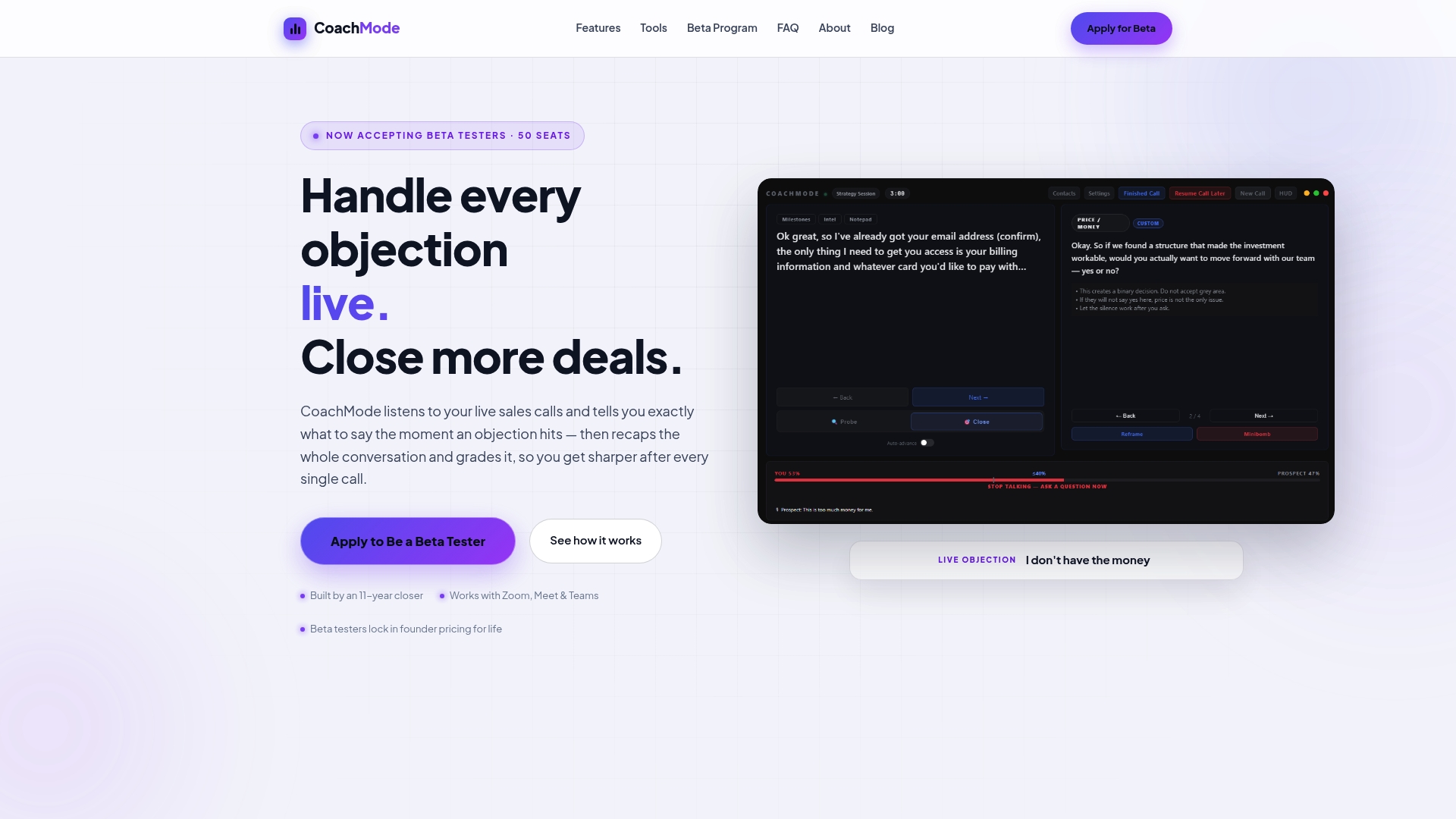
Getcoachmode’s live in-call coaching delivers objection responses, discovery cues, and buying signal alerts to the rep’s screen while the call is still in progress. Post-call, the platform generates a scored recap that grades talk ratio, objection handling, and next-step commitment. That combination, live guidance plus structured post-call review, addresses both the in-the-moment failure mode and the longer-term skill-building gap.
Core capabilities tied directly to buyer questions:
- Live objection responses: When a prospect says “your price is too high” or “we’re already working with someone,” the rep sees a tested response within seconds, not after the call ends.
- Talk-ratio feedback: Reps who talk too much on discovery calls lose deals. Getcoachmode surfaces talk-time data in real time so reps can self-correct mid-call.
- Customizable script integration: Your existing sales methodology, objection library, and discovery framework can be loaded directly into the platform. You are not locked into generic prompts.
- Post-call scoring: Every call gets a structured grade. Managers use the scores as a concrete agenda for 1:1 coaching sessions rather than relying on memory or selective listening.
- Integrations: The platform runs on Zoom, Google Meet, and Teams, covering the three dominant video call platforms for B2B sales teams.
Onboarding is white-glove. Getcoachmode’s setup process includes personalized configuration of your objection library and script integration, so the tool is calibrated to your specific sales motion before the first live call. For teams without a dedicated RevOps function, that matters.
For high-ticket closers specifically, the ROI case is direct: fewer objections lost, less discounting under pressure, and faster ramp for new hires who can lean on live guidance while they build pattern recognition.
When should you choose real-time coaching over post-call or roleplay?
The honest answer is that most sales teams need all three categories at different stages. But if you are choosing where to invest first, the decision comes down to where your revenue is leaking.
Real-time in-call coaching is the right primary investment when your reps are losing deals on live calls, not in the pipeline. If your CRM shows deals entering late-stage and then dying, the problem is almost certainly what happens on the call itself, not what happens in the CRM. A rep who freezes on a procurement objection or caves on price under pressure needs help in the moment. Post-call analytics will tell you the pattern exists. Real-time coaching changes the outcome before the deal is lost.
Post-call analytics and conversation intelligence are the right primary investment when you are coaching at scale across many reps and deal tiers. If you manage 30 reps across multiple segments, you cannot listen to every call. A post-call platform that surfaces the five calls per week that need attention, ranked by deal risk or coaching opportunity, is a force multiplier for a manager’s time. The limitation is that the coaching happens after the damage is done.
Roleplay and simulation tools are most valuable during onboarding and certification, not as a substitute for live-call coaching. The forgetting curve research is clear: skills learned in a training environment decay fast without reinforcement in real contexts. Roleplay builds initial muscle memory; real-time coaching reinforces it where it counts.
The practical pilot advice: measure both behavioral signals (talk ratio, objection response rate, discovery question frequency) and revenue signals (win rate, average deal size, time to close) from week one. Behavioral signals move first and predict revenue signals by 4–6 weeks. If you see behavioral improvement without revenue lift after 90 days, the tool is working but something else in the funnel is broken.
Start your Getcoachmode pilot with live-call data
If your team closes high-ticket deals on Zoom, Google Meet, or Teams, Getcoachmode gives you a faster path to measurable lift than any post-call-only platform. The pilot is designed to produce a clear go/no-go signal in four weeks: live-call analysis from day one, white-glove setup of your objection library and scripts, and baseline metrics captured before the first coached call so you can see the delta clearly.
Onboarding is handled for you. Getcoachmode’s team configures the platform to your sales motion, not a generic template, so your reps are working with prompts that reflect your actual deals and objections from the first call. Bring three things to your trial kickoff: a sample of your most common objections, your current CRM setup, and a clear definition of what “a good call” looks like for your team. Those three inputs are what separate a calibrated pilot from a generic software test.
Start your Getcoachmode trial and see what your reps’ live calls look like with real-time guidance running.
Sources
- Building the business case for sales coaching | Korn Ferry
- What is the forgetting curve in sales training? | Ardent Learning
This article is general information, not a substitute for advice from a qualified lawyer. Consult a qualified legal professional about your own circumstances before acting on anything here.