The fastest way to find decision makers is to map the buying committee first, then use role-filtered prospecting tools to verify contacts before you write a single word of outreach. Start with Apollo for layered filters and intent signals, Hunter.io for quick domain-level email discovery, or ZoomInfo if your team needs enterprise-scale coverage. Once you’re consistently reaching verified contacts, Getcoachmode handles what comes next: converting those calls into closed deals.
Quick-start shortlist:
- Apollo — role filters, intent signals, built-in sequences
- Hunter.io — domain search and email verification
- ZoomInfo — deep firmographic and direct-dial coverage
- Clay — templated prospect-to-outreach workflows
- Getcoachmode — real-time coaching once you’re on the call
Pro Tip: Before running any tool, write down the job function that owns the problem you solve. Finance? IT? Operations? That single filter cuts your research time in half.
Key Takeaways
The most reliable way to find decision makers is to map the buying committee across 3–5 functions, verify contacts before outreach, and thread every deal from the first touch.
| Point | Details |
|---|---|
| Map before you prospect | Build a 3–5 contact stakeholder map per account before writing any outreach. |
| Verify direct dials first | Run a 5-dial validation test; below 40% connect rate signals a data quality problem. |
| Thread every deal | Buying groups for complex B2B purchases commonly include multiple stakeholders. |
| Use discovery questions | Ask “Who else will be involved?” and “What does sign-off look like?” on every first call. |
| Getcoachmode closes the loop | Once contacts are verified and engaged, Getcoachmode’s live coaching lifts demo-to-close conversion. |
Table of Contents
- Which tools help you find decision makers?
- How to find decision makers at any target company
- How to use tool features without wasting credits
- How to tell who actually controls the budget
- How to sequence outreach to reach decision makers
- How to choose the right prospecting tool for your team
- What separates high-performing prospecting teams from the rest
- What Getcoachmode does once you’re on the call
- Sources
Which tools help you find decision makers?
The table below covers the dimensions that actually affect whether a tool saves you time or wastes your credits.
A few notes on the field:
Apollo’s intent and hiring-signal filters are genuinely useful for prioritizing which accounts to work first, not just who to contact. ZoomInfo’s dataset is larger than most competitors’, but the pricing reflects that. For smaller teams, UpLead’s real-time verification and Lusha’s browser plugin offer a lower-friction entry point.
Cognism stands out for teams operating across borders, particularly where GDPR compliance is non-negotiable. LeadIQ’s strength is its LinkedIn capture workflow: you find a contact on LinkedIn, the extension pulls verified data and pushes it directly to your CRM. RocketReach cross-references multiple sources before surfacing an email, which reduces bounce rates on cold sends.
Origami takes a different approach entirely. Instead of querying a static database, it prompts across live public sources, which means fresher results for niche roles but less consistency at scale.
Pro Tip: *Run a 10-account coverage test before you commit. Pull 10 target accounts from your ICP, search each in the tool, and count how many return a verified direct dial.
How to find decision makers at any target company
This is the workflow SDRs and AEs can run on any account, start to finish.
-
Define your ICP with buying behavior, not just firmographics. Company size and industry get you to the right account. Buying behavior, budget ownership, and likely decision-making roles get you to the right person. Lead Forensics recommends starting with a robust ICP that goes beyond titles to roles likely involved in purchases.
-
Identify the function that owns the problem. If you sell security software, start with the CISO or VP of IT. If you sell spend management, start with the CFO’s direct reports. Pick the department first, then filter by seniority.
-
Search LinkedIn for director-level champions before going to the C-suite. Directors own day-to-day pain and can sponsor escalation internally. Going straight to the CEO without a champion is usually slower, not faster.
-
Layer in research signals. Check the company’s leadership page, recent press releases, and job postings. A company hiring a “Director of Revenue Operations” is actively building out a function. That’s a buying signal. Apollo’s playbook recommends mapping 3–5 contacts across functions before outreach, using intent and hiring signals to prioritize.
-
Run the account through your primary tool. Use role, department, seniority, and company size filters together. Export the contacts that match.
-
Verify before you send. Run emails through a verification step (Hunter.io’s verifier, Apollo’s built-in check, or UpLead’s real-time verification). For direct dials, call one number manually before loading a batch into a sequence.
-
Enrich your CRM and dedupe. Push verified contacts into your CRM with source tags. Flag any duplicates before the record goes live.
- Check LinkedIn for recent role changes (a new VP often means a new budget cycle)
- Cross-reference job postings for tech stack clues (a posting requiring Salesforce experience confirms the CRM)
- Note any exec moves in press coverage, they often signal a strategic shift and a new buying window
Pro Tip: Use discovery questions early in the first call to surface hidden stakeholders. “Who else will be involved in this decision?” and “What does sign-off look like internally?” are two of the highest-yield questions in B2B sales.
How to use tool features without wasting credits
Domain search
Type in a company’s domain and you get a map of email patterns and known contacts. Use it when you have the company name but no individual contacts yet. Hunter.io is the cleanest interface for this. The output tells you the email format (first.last@company.com vs. f.last@company.com) and lists any publicly verified addresses. Cross-check the pattern against LinkedIn to confirm the format before sending.
Decision-maker filters
Title logic is messier than it looks. “Head of Marketing” and “VP of Marketing” often describe the same authority level at different company sizes. Most tools normalize seniority into tiers (director, VP, C-suite), but the underlying title data is inconsistent. Use department filters alongside seniority filters rather than relying on title keywords alone. A search for “Finance, Director+” will surface more real budget owners than a keyword search for “CFO.”

Bulk export and API
Bulk export is where bad lists get built. Before exporting 500 contacts, run a 20-contact sample manually and check the bounce rate on emails and the connect rate on dials. For CRM sync, use waterfall enrichment: run your primary tool first, then fill gaps with a secondary source. Dedupe rules should run before records hit your CRM, not after.
Chrome extensions
LeadIQ and Lusha both offer browser extensions that surface contact data while you’re on a LinkedIn profile. Fast and convenient, but verify the output before loading it into a sequence. Extensions pull from cached or crowdsourced data that can lag behind a tool’s main database.
| Feature | Best use case | Key risk |
|---|---|---|
| Domain search | Unknown contact patterns at a target company | Email format may vary by department |
| Role/dept filters | Building a stakeholder map across functions | Title normalization inconsistencies |
| Bulk export | Scaling a verified list for sequences | High bounce rate if unverified |
| Chrome extension | Quick enrichment on LinkedIn | Data freshness lag |
| API/CRM sync | Waterfall enrichment and deduplication | Duplicate records if rules aren’t set |
Pro Tip: Set a credit budget per account before you start. Tools charge per export or per enrichment. Running filters first and exporting only verified matches keeps costs predictable.
How to tell who actually controls the budget
Titles are a starting point. Real authority usually shows up in different signals. Lead Forensics notes that budget ownership and strategic accountability are more reliable indicators than seniority alone.
Signals that point to a real decision-maker:
- Mentioned in press releases tied to budget decisions or vendor announcements
- Listed as a signatory or sponsor in public procurement documents
- Owns a P&L or cost center (often visible in LinkedIn summaries or company org charts)
- Involved in recent hiring for the function your product supports
- Referenced in job postings as the hiring manager for a role your product would support
Discovery questions to confirm authority:
- “Who owns the budget for this initiative?”
- “What does the approval process look like from here?”
- “Who else will be part of the evaluation?”
- “Have you gone through a purchase like this before? Who was involved?”
- “If we move forward, what does sign-off look like on your end?”
Buying groups for complex B2B purchases commonly include multiple stakeholders, which means the person who takes your first call is rarely the only person who matters. Map influence separately from engagement: someone who attends every demo but never shares the proposal internally is engaged but not influential. Someone who asks about procurement timelines on the first call is influential even if they seem junior.
Update your stakeholder map after every contact. Compare verbal enthusiasm to actual account behavior: are they sharing documents? Bringing in colleagues? Scheduling follow-ups without prompting?
Pro Tip: Ask “Who else should be on this call?” at the end of every discovery call. It’s the single fastest way to expand your thread without cold-prospecting the rest of the committee.
How to sequence outreach to reach decision makers
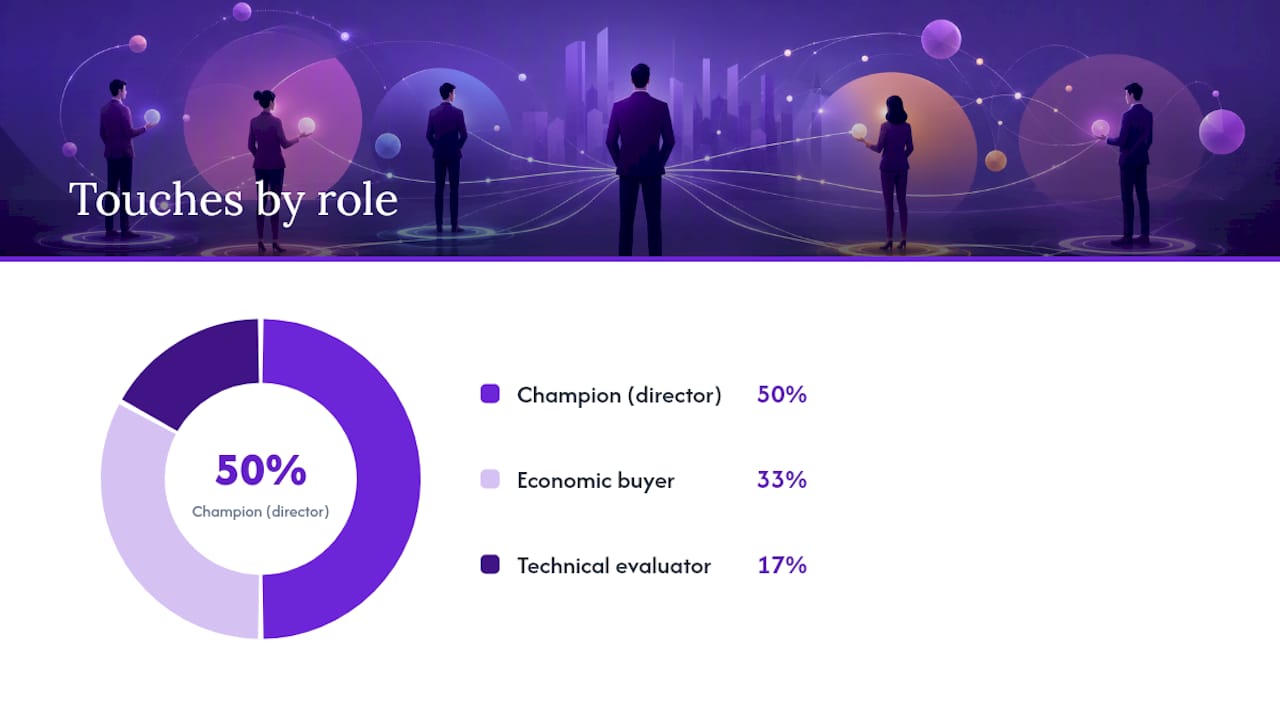
Multithreading improves win rates by engaging multiple stakeholders with role-specific messages rather than betting on a single contact. Here’s a six-touch sequence built for a three-person buying committee.
- Touch 1 (Email to director-level champion): Short, problem-specific. One sentence on the pain, one on the outcome, one ask for a 15-minute call.
- Touch 2 (LinkedIn connection to economic buyer): No pitch. A relevant comment on their recent post or a connection request with a one-line context note.
- Touch 3 (Follow-up email to champion): Add a relevant case study or data point. Ask if there’s a technical evaluator you should loop in.
- Touch 4 (Direct dial to champion): Keep it under 30 seconds. Reference the emails, confirm the pain point, ask for the meeting.
- Touch 5 (Email to economic buyer): One-paragraph executive brief. Focus on business outcome, not features. Reference the champion by name if you have a relationship.
- Touch 6 (LinkedIn message to technical evaluator): Specific to their role. Offer a technical resource or a short demo tailored to their function.
Gatekeeper tactics:
- Treat gatekeepers as intelligence sources, not obstacles. HubSpot recommends building rapport with gatekeepers to surface non-obvious influencers and blockers.
- Ask: “Who typically handles decisions like this?” rather than “Can I speak to the decision-maker?”
- If you reach voicemail, leave a 15-second message with your name, company, and one specific reason for calling. Reference a mutual connection or a recent company event if you have one.
Pro Tip: Use objection-handling frameworks to prepare for the “we’re not interested” response before you dial. The first objection on a cold call is almost never the real one.
How to choose the right prospecting tool for your team
Run these checks before you sign a contract.
Checklist:
- Dataset covers your ICP’s industries and company sizes
- Verified direct dials available (not just emails)
- Filters include role, department, seniority, company size, and industry simultaneously
- Native integration with your CRM (Salesforce, HubSpot, or equivalent)
- Sequence tool integration (Outreach, Salesloft, or equivalent)
- API or bulk export available for your volume
- Cost per verified contact fits your CAC model
- Free tier or pilot available to test before committing
Three quick validation tests:
- 10-account coverage test. Pull 10 accounts from your ICP. Search each in the tool. Count verified contacts returned per account. Target: at least 3 verified contacts per account.
- 5-direct-dial validation. Export 5 direct dials. Call each one. Track connect rate. Anything below 40% on a small sample signals data quality issues.
- CRM sync demo. Ask the vendor to demo a live sync from the tool to your CRM. Watch for duplicate handling and field mapping. A 30-minute pilot that surfaces sync errors before purchase saves weeks of cleanup.
Run the 30-minute pilot across all three tests simultaneously. If a tool passes all three, it’s worth a full trial. If it fails the direct-dial test, no amount of email coverage makes up for it in a phone-heavy motion.
What separates high-performing prospecting teams from the rest
Most teams treat prospecting as a data problem. The real gap is process discipline.
The teams that consistently reach and convert decision makers do three things differently. First, they verify before they sequence, not after. A bad list loaded into an outreach tool doesn’t just waste time; it burns your sending domain and your reps’ morale simultaneously. Second, they thread every deal from day one. Relying on a single champion is optimism, not strategy. Multithreading with role-specific collateral and repeated verification is what top-performing teams actually do. Third, they treat the discovery call as a stakeholder-mapping exercise, not just a qualification call.
The metric most teams ignore: how many functions are engaged per deal at the end of week two. If the answer is one, the deal is fragile regardless of how warm that one contact seems. Map the committee early, update it after every call, and measure thread breadth as a leading indicator of deal health.
Coaching matters here too. Finding the right contact is only half the problem. What happens on the call determines whether the deal moves. Reps who can navigate objections fluently, ask the right discovery questions, and read buying signals in real time close at higher rates than reps who can’t, regardless of how good their list is.
What Getcoachmode does once you’re on the call
Finding verified decision makers is the first half of the equation. The second half is what you say when they pick up.
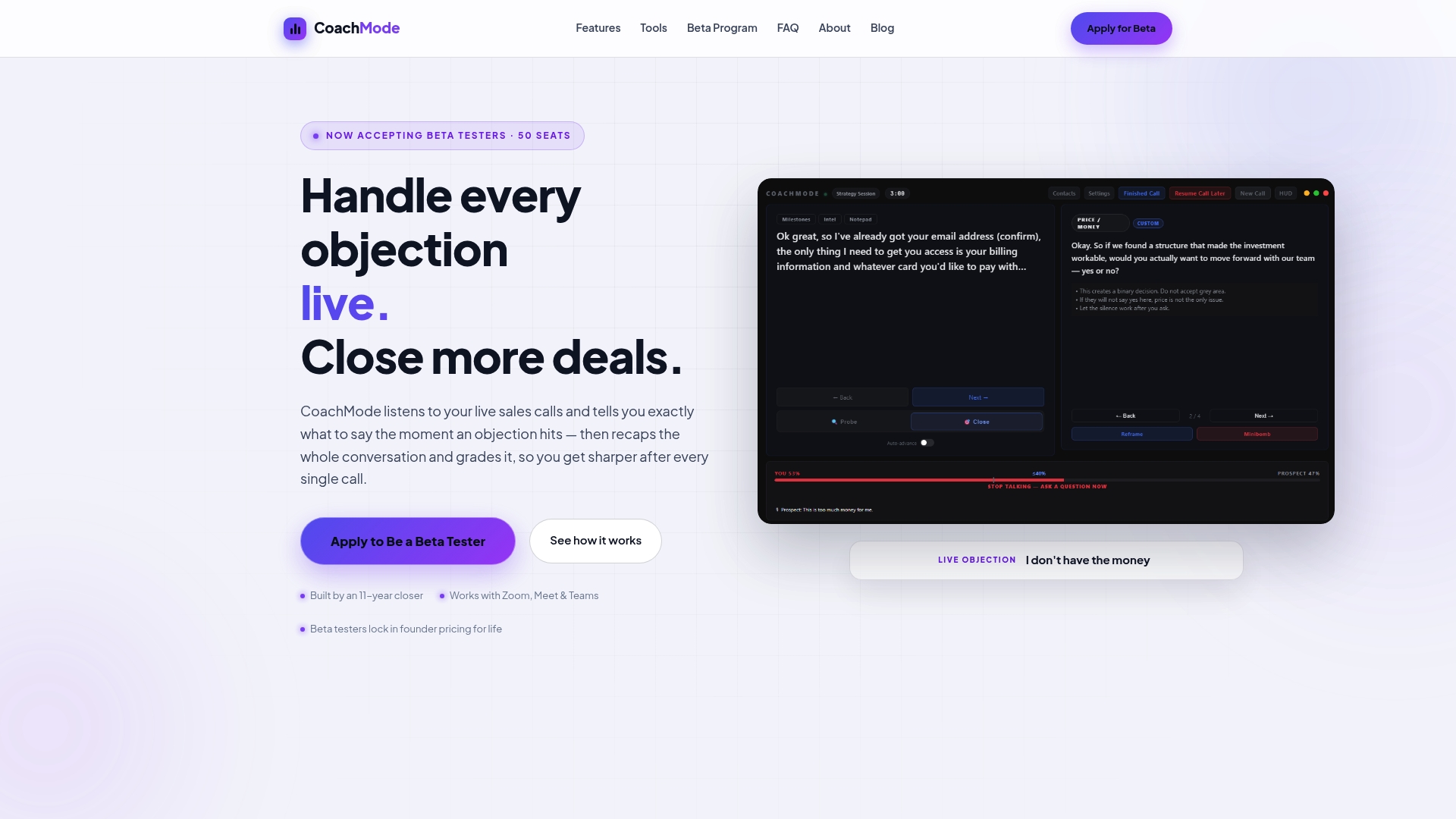
Getcoachmode is real-time AI sales coaching software built for high-ticket closers. It listens to your live call on Zoom, Google Meet, or Teams and surfaces instant objection responses, discovery prompts, and buying-signal flags exactly when you need them. After the call, it grades your performance, tracks your talk ratio, and flags where the conversation stalled.
For teams that can already reach decision makers consistently but struggle to convert demos into closed deals, Getcoachmode addresses the gap directly. The post-call scoring system also helps managers coach reps on stakeholder handling without sitting in on every call.
Start your pilot after your first 10 verified contacts are engaged. Try Getcoachmode’s AI sales coach and see where your calls are losing ground.
Sources
- How Do I Identify Decision-Makers at a Prospect Company? | Apollo
- Multi-threaded sales approach | ZoomInfo Pipeline
- How to Identify Gatekeepers, Decision-Makers, Influencers, & Blockers | HubSpot
- Multithreading in Sales: The B2B Selling Framework | Highspot