For most sales managers, the right move is to pilot an AI-powered solution that pairs real-time coaching with post-call analytics, and run it for a short period before signing anything longer. Conversion-based metrics like conversation rate predict revenue better than dial volume, and platforms like Amazon Transcribe now make live sentiment and category detection standard. CoachMode is built for exactly this pilot model.
Before you request a demo, lock in what the pilot needs to prove:
- Baseline conversation rate and objection-to-meeting conversion, measured before rollout.
- A defined short window with a fixed rep cohort.
- Primary success metric: lift in objection-to-meeting conversion, not raw call count.
Key Takeaways
Sales call analytics works best when real-time coaching handles live objections and post-call scorecards drive weekly calibration, with conversion metrics, not dial volume, proving the pilot’s impact.
| Point | Details |
|---|---|
| Track leading indicators | Conversation rate, meeting-set rate, and objection-to-meeting conversion forecast pipeline better than dial volume. |
| Match mode to use case | Real-time coaching suits live objection handling; post-call analytics suits compliance QA and trend review. |
| Run a short, defined pilot | Test with a 4 to 8 rep cohort over 14 to 30 days, measuring objection conversion as the primary metric. |
| Confirm integrations before signing | Verify CRM field mapping, meeting-platform support, and data deletion policy during the demo. |
| CoachMode fits the real-time checklist | Its live objection responses, post-call scorecard, and CRM sync align with the must-have criteria managers should prioritize in a pilot. |
Table of Contents
- What Does Sales Call Analytics Software Actually Do?
- How Do You Choose the Right Sales Call Analytics Tool?
- Real-Time vs Post-Call Analytics: Which Do You Need?
- Which Sales Call Metrics Actually Predict Revenue?
- What Belongs on Your Deployment Checklist?
- What Should Sales Call Analytics Cost, and What’s the Payback?
- What Do Research-Backed Sales Pilots Actually Look Like?
- Why CoachMode Fits This Buying Checklist
- What’s a Sharp, Contrarian Take on Sales Call Analytics?
- Get a Faster Path to Better Sales Conversations With CoachMode
- Frequently Asked Questions
- Sources
What Does Sales Call Analytics Software Actually Do?
Sales call analytics software records a sales conversation, transcribes it, and runs natural language processing against that transcript to tag topics, score performance, and surface patterns a manager would otherwise miss. Some platforms handle this in real time, overlaying coaching prompts while the call is still live. Others process everything after the call ends and hand you a report the next morning. Most serious platforms now do both.
The category has settled around a common set of capabilities:
- Transcription and speaker diarization — separating rep speech from prospect speech automatically.
- Topic and keyword detection — flagging pricing mentions, competitor names, or specific objections.
- Sentiment analysis — tracking tone shifts across the call, a feature Amazon Transcribe lists explicitly alongside call-driver detection and non-talk time.
- Objection detection and scoring — identifying where a rep stalled or recovered.
- Searchable call library — so a manager can pull every call that mentioned a specific competitor in seconds.
- CRM sync — pushing call outcomes and notes directly into the deal record.
- Real-time coach or agent assist — surfacing next-best responses while the rep is still talking.
An SDR team might use this to sharpen cold-outreach openers. An account executive team leans on it for discovery-call coaching. A retention team uses it to triage renewal risk from tone shifts alone, and regulated industries use it for compliance monitoring on every recorded call.
How Do You Choose the Right Sales Call Analytics Tool?
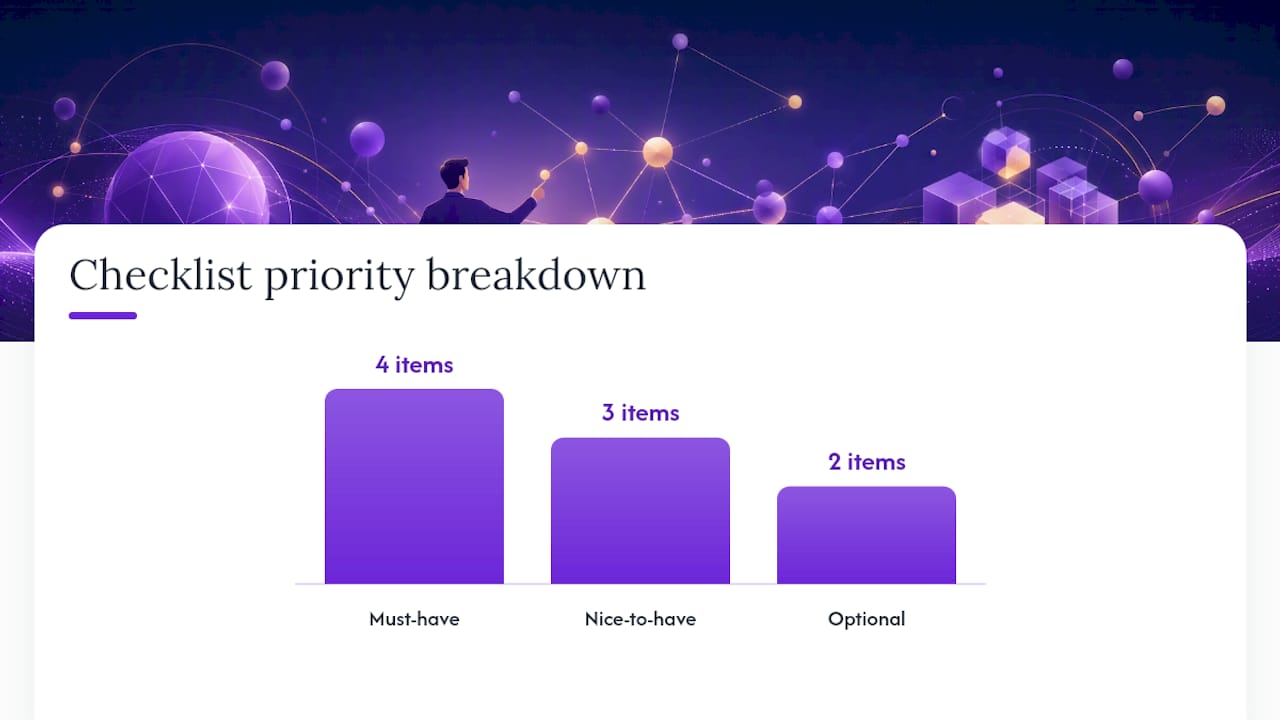
Start with a checklist, not a features list. Vendors are good at listing capabilities. Your job is to sort those capabilities into what you actually need versus what sounds nice in a demo.
Must-have:
- Real-time coaching or agent assist during live calls, not just after.
- Post-call scorecards with customizable criteria your managers actually use.
- Native CRM and calendar integration (Salesforce or HubSpot, plus Zoom, Google Meet, or Teams).
- Documented security controls: encryption in transit and at rest, data residency options, and admin-level access controls.
Nice-to-have:
- API access for custom exports and dashboards.
- Configurable battle cards tied to specific objection types.
- Sentiment trend reporting across a full deal cycle, not just a single call.
Optional:
- Generative call summaries.
- Multi-language transcription support.
When you sit down for a vendor demo, test the things marketing pages gloss over:
- Ask for the actual latency on live coaching prompts. A three-second delay during a price objection is worse than no prompt at all.
- Request a sample scorecard filled out on a real call, not a blank template.
- Confirm CRM sync timing: is it instant, or does it batch overnight?
- Ask what happens to call data if you cancel. Deletion policy matters as much as retention policy.
Buyer research on review platforms consistently shows integration depth and support responsiveness driving vendor selection more than any single flashy feature.
If you run a small, high-ticket closing team, an integrated coaching-first platform beats stitching together a separate dialer and analytics stack. If you’re running a large SDR floor doing volume outreach, a dedicated analytics layer bolted onto your existing dialer might make more sense.
Pro Tip: Ask every vendor the same three demo questions, in the same order, and score the answers on a simple 1 to 5 scale. It sounds basic, but it’s the only way to compare apples to apples once you’ve sat through five different sales pitches in one week.
Real-Time vs Post-Call Analytics: Which Do You Need?
Real-time analytics coaches the rep while the deal is still live. Post-call analytics reviews what already happened. Both matter, but they solve different problems, and picking the wrong one for your team’s sales cycle wastes budget.
Real-time systems need low-latency audio capture, a coaching overlay that doesn’t distract the rep mid-sentence, and support for whatever meeting platform your team already uses. Amazon Transcribe’s streaming Call Analytics shows what this looks like at the infrastructure level: category events, issue detection, and PII redaction running while the call is still happening. A well-designed HUD sticks to one-line prompts and pre-approved responses. Long scripts on screen mid-call just add friction.
| Factor | Real-time analytics | Post-call analytics |
|---|---|---|
| Best for | Live objection handling, high-ticket closes | Historical QA, monthly trend review |
| Latency requirement | Under a few seconds | Not applicable |
| Infrastructure need | Streaming audio pipeline | Batch processing |
| Coaching moment | During the call | Next-day or weekly review |
| Compliance fit | Harder to audit live | Easier for compliance-heavy workflows |
If your sales cycle is short and deals hinge on how a rep handles one specific objection in real time, real-time coaching earns its cost fast. If you’re running large-scale QA across hundreds of calls a month for compliance reasons, post-call analytics is the more practical layer to build first.
Which Sales Call Metrics Actually Predict Revenue?
Most teams track the wrong number. Dial volume feels productive, but it doesn’t forecast pipeline. Conversion-based metrics do, and the gap between the two is where most sales call analysis tools earn or lose their keep.
The metrics worth tracking:
- Conversation rate — connects divided by dials. A leading indicator of pipeline health.
- Meeting-set rate — conversations that convert into a booked meeting.
- Objection-to-meeting conversion — how often a handled objection still ends in a meeting, arguably the single best signal of rep skill.
- Average conversation duration — too short often means a weak discovery; too long can mean a rep who can’t close.
- Talk-to-listen ratio — a rep talking 80% of the call is usually losing the deal, not winning it.
- First-call show-up rate — did the booked meeting actually happen?
- Pipeline velocity — how fast deals move stage to stage.
- Cost per meeting — total spend divided by meetings booked, useful for the ROI conversation with finance.
Conversation rate, objection conversion, and pipeline velocity are leading indicators. They tell you what’s coming. Dial volume and total call count are lagging noise dressed up as activity. Harte Hanks recommends benchmarking calls per day against connect rate and closing rate together rather than chasing any single number in isolation.
For a pilot, structure it like this:
- Run a two-week baseline with no changes, capturing current conversation and meeting-set rates.
- Introduce the tool to a defined cohort of 4 to 8 reps.
- Measure objection-to-meeting conversion lift as your primary metric over 14 to 30 days.
- Track pipeline velocity as a secondary metric if your sales cycle is long enough to show movement.
What Belongs on Your Deployment Checklist?
A tool only works if it actually gets used. Deployment most often fails not on the technology but on governance and adoption planning nobody bothered to write down before launch.
Before you flip the switch:
- Define pilot objectives and the two or three KPIs you’re measuring.
- Pick a specific rep cohort, not “everyone,” for the first 30 days.
- Secure SSO access and confirm who on your team gets admin rights.
- Map exactly which CRM fields need to sync, and in which direction.
Integration and governance both need explicit answers, not assumptions:
- CRM mapping (Salesforce or HubSpot field-level sync, not just “it connects”).
- Calendar and meeting-link support (Zoom, Google Meet, Teams).
- Telephony or dialer integration if calls originate outside a browser meeting.
- Storage and export options, including whether the vendor supports private cloud storage for compliance-sensitive teams.
- Data retention and redaction policies, spelled out in writing before rollout, not after a data request comes in.
- Manager coaching cadence and scorecard calibration sessions, scheduled from day one, not added later.
Vendor documentation on encryption in transit and at rest, data residency options, and admin access controls should be table stakes in your evaluation, not a follow-up question after signing.
What Should Sales Call Analytics Cost, and What’s the Payback?
Pricing in this category usually falls into one of three models. Per-seat monthly pricing is simplest for AE teams where headcount is stable. Per-call or consumption pricing fits SDR teams with high call volume but fluctuating headcount. Tiered bundles split the difference, often gating real-time coaching behind a higher tier than post-call analytics alone.
Watch for costs that don’t show up on the pricing page:
- Telephony fees charged separately from the software license.
- Storage and export charges once you exceed a call-volume threshold.
- Custom integration engineering for CRM fields that don’t map out of the box.
- Professional services fees for playbook and scorecard setup.
A simple ROI formula: (lift in meeting-set rate × average deal value × close rate) minus total tool cost, divided by tool cost, gives you payback in plain terms. If a 10-rep team lifts objection-to-meeting conversion by even a few points and each meeting is worth real pipeline, the tool often pays for itself inside a single quarter.
Pro Tip: Build your ROI case around objection-to-meeting conversion, not total calls handled. Finance teams trust a conversion lift number far more than an activity number, and it’s the metric most likely to survive scrutiny in a budget review.
What Do Research-Backed Sales Pilots Actually Look Like?
The best pilot designs don’t wait for closed-won deals to prove value. They measure the earlier links in the chain, because conversion lift at the conversation and meeting stages shows up in weeks, not quarters.
Practices worth adopting directly:
- Track conversion at every funnel step, not just the final one.
- Prioritize objection conversion and meeting quality over raw dial counts.
- Run short, iterative pilots so you can calibrate scorecards before scaling.
- Treat objections as buying signals worth analyzing individually, not as friction to count and discard.
OutboundSalesPro recommends daily, weekly, and monthly review cadences for cold-calling metrics, and that structure translates well to analytics rollouts: daily quick reviews catch obvious misses, weekly deep dives calibrate scorecards against real calls, and monthly sessions check whether the trend is actually moving pipeline velocity.
A pilot that measures conversion lift from conversation to meeting to show-up gives a manager usable evidence in weeks. Waiting for closed-won data to validate a tool means waiting through an entire sales cycle before you know if it’s working.
Why CoachMode Fits This Buying Checklist
Run CoachMode’s capabilities against the must-have list from earlier and the match is direct. Real-time objection responses during live calls map to the “real-time coaching” requirement. The live coaching overlay, built for Zoom, Google Meet, and Teams, covers the meeting-platform question. Post-call scorecards and talk-ratio feedback handle the scoring and calibration piece managers need for weekly reviews.
What sets CoachMode’s real-time coaching apart from a straight transcription-and-tag tool is timing. It listens to the live conversation and delivers a response the moment an objection lands, rather than flagging it for review after the deal is already lost. That single-sentence prompt during a price objection is the difference between a rep freezing and a rep staying in control of the call.
For teams evaluating this against the checklist:
- CRM sync keeps deal notes current without manual entry.
- The post-call scorecard gives managers a consistent grading structure across every rep, every call.
- White-glove onboarding means your first pilot week isn’t spent configuring integrations from scratch.
Pro Tip: When you pilot CoachMode or any real-time platform, tell reps explicitly that the tool is there to support them mid-call, not monitor them. Adoption rises sharply once reps stop treating the HUD as surveillance and start treating it as backup.
The next step is straightforward: request a 14 to 30 day pilot, measure objection-to-meeting conversion and meeting-set rate against your baseline, and decide from real numbers instead of a demo reel.
What’s a Sharp, Contrarian Take on Sales Call Analytics?
Most sales teams overbuy on dashboards and underinvest in the moment coaching actually matters: mid-call, mid-objection. A dashboard full of talk-ratio charts is useless to a rep who’s already lost the prospect by the time the report gets reviewed Monday morning. The conventional advice, “get better call visibility,” misses that visibility after the fact doesn’t change the outcome of the call that already happened.
What the evidence actually supports is narrower and more useful: track conversion at each funnel stage, prioritize objection-to-meeting conversion over dial counts, and put coaching where the deal is still live. Post-call analytics has its place for compliance and trend work, but it’s a QA tool, not a revenue lever.
If you’re building a pilot this quarter, resist the urge to measure everything. Pick objection conversion and meeting-set rate, run it for a defined cohort, and decide in weeks rather than a full sales cycle. The teams that win with this technology are the ones disciplined enough to measure two numbers well instead of twelve numbers poorly.
Get a Faster Path to Better Sales Conversations With CoachMode
The buying process above takes real work: mapping features, checking security documentation, running pilots, and calibrating scorecards. Getcoachmode built CoachMode to shortcut that process for teams that specifically need real-time objection handling, not just another dashboard to review on Friday. Where most analytics tools tell you what went wrong after the call ends, CoachMode listens live and gives your reps the exact words to say while the deal is still winnable.
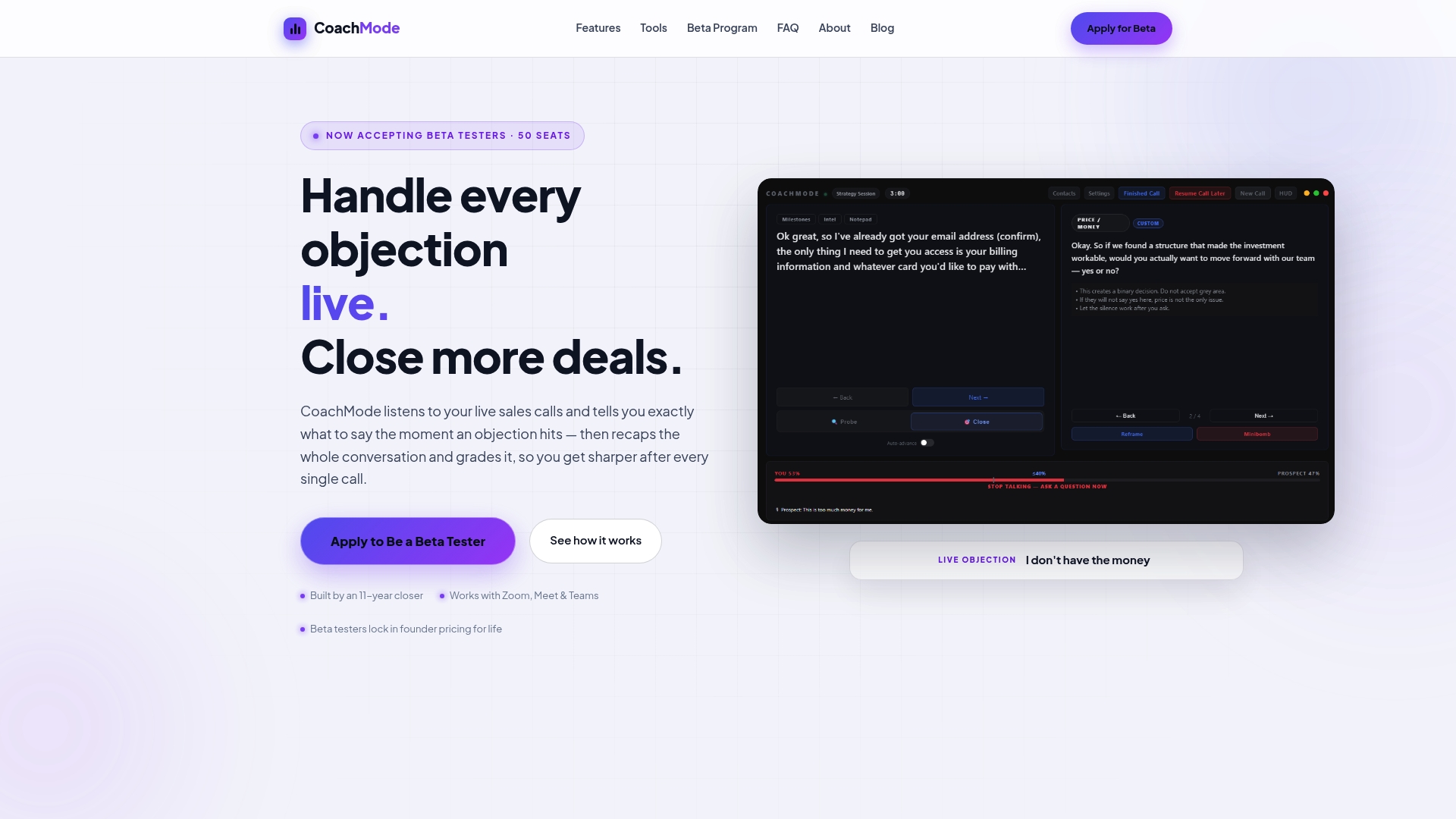
That distinction matters most for high-ticket closers, agency owners, and B2B teams where one lost objection means a lost deal, not just a lower score in a weekly report. CoachMode pairs that live coaching with the post-call scorecard and talk-ratio feedback your managers need for calibration, plus white-glove onboarding so your pilot starts fast instead of stalling on setup.
If the checklist in this article matches what your team needs, the next step is simple: start a CoachMode pilot and measure objection-to-meeting conversion against your baseline over the next 30 days.
Frequently Asked Questions
What is sales call analytics software used for?
It transcribes and analyzes sales conversations to surface patterns like objection handling, sentiment shifts, and talk ratios, then scores calls so managers can coach reps with specific evidence instead of guesswork.
Is real-time call analytics better than post-call analytics?
Neither replaces the other. Real-time coaching helps in live, high-stakes moments like price objections, while post-call analytics works better for compliance QA and monthly trend reviews across large call volumes.
What sales call metrics should I prioritize first?
Start with conversation rate, meeting-set rate, and objection-to-meeting conversion. These conversion-based metrics predict pipeline more reliably than raw dial counts.
How long should a sales call analytics pilot run?
Fourteen to thirty days with a defined cohort of four to eight reps gives you enough data to measure conversion lift without waiting an entire sales cycle for closed-won results.
Does CoachMode work with Zoom, Google Meet, and Teams?
Yes. CoachMode supports live coaching across all three platforms, with post-call scorecards and CRM sync included in the same workflow.
Sources
- Cold Call Metrics That Predict Revenue | QUOTA Training
- Real-time Call Analytics (Amazon Transcribe) — Streaming documentation
- Amazon Transcribe Call Analytics — product overview
- 5 key inside sales call metrics — Harte Hanks
- The 12 Cold Calling Metrics to Track Every Day — OutboundSalesPro