Four prompts cover every phase of a discovery call: a pre-call research prompt that builds a working hypothesis, an in-call prompt that generates fast follow-up questions, a post-call scoring prompt that grades the conversation on five dimensions, and a recap email prompt that drafts the follow-up. Pair those with a prioritized question bank, split between what you ask live and what you gather beforehand, and you fix most of what goes wrong on a 30-minute call. The templates and sample outputs below are ready to copy.
TL;DR:
- Using well-structured AI prompts at each call stage improves discovery call outcomes by producing clear, skimmable insights rather than vague summaries.
- Replacing generic questions with role-specific, detailed prompts helps generate targeted hypotheses, follow-up questions, and scoring rubrics.
- Limiting live questions to nine focused ones and handling the rest asynchronously optimizes the call flow and preserves conversational quality.
- Implementing a five-dimensional scoring system and matching follow-up language to scores enhances deal qualification and decision clarity.
- Adding real-time AI coaching during calls provides instant objection responses, bridging gaps in preparation and boosting closing confidence.
Table of Contents
- Copy-Ready Discovery Call Prompts for Every Stage
- How to Design Prompts That Don’t Waste Your Time
- The Discovery Question Bank: What to Ask Live vs. Beforehand
- Running the Call: A 30-Minute Script and Pre-Call Checklist
- Scoring the Call and Deciding What Happens Next
- How Live AI Coaching Fits Into the Discovery Workflow
- Where Prompts Add the Most Leverage
- Try the Prompts, Then Let CoachMode Handle the Live Moment
- Sources
Copy-Ready Discovery Call Prompts for Every Stage
Most sales reps use AI the same clumsy way: they paste a company name into a chatbot and ask for “background info,” then get three paragraphs of recycled homepage copy. The fix isn’t a better model. It’s a better prompt shape. Every template below follows the same structure: a role, specific context, a required output format, and (where it matters) a rubric.
1. Pre-call research prompt
Feed the model the prospect’s company name, title, LinkedIn summary, and any inbound context (form fill, referral note, past email thread). Ask for output in this shape:
- A working hypothesis about their likely pain point, in one sentence
- Three signal questions that would confirm or kill that hypothesis
- One recall trigger, a specific detail (a recent funding round, a product launch, a role change) to reference naturally in the first two minutes
Sample output: “Hypothesis: as a 40-person ops team scaling past 200 customers, they’re likely hitting manual reporting bottlenecks. Signal questions: How is reporting handled today? Who owns that process? What breaks first when volume doubles? Recall trigger: they just closed a Series A, mention it in your opener.” This is the exact model recommended in Timothy Kilroy’s breakdown of AI prompts for discovery calls, and it works because it forces the output into something skimmable in under 90 seconds, not a wall of text you skim past.
2. In-call question generator prompt
This one runs during the call, in a second tab or a coaching tool listening in real time. Feed it the last two or three things the prospect said. Ask for three probing follow-ups, each with a one-line rationale for why it deepens the conversation rather than restating it.
Sample output: “Follow-up 1: ‘What’s the cost of that delay to the team right now?’ (surfaces impact). Follow-up 2: ‘Who else feels that pain?’ (maps stakeholders). Follow-up 3: ‘What have you tried already?’ (tests prior effort and urgency).”
3. Post-call scoring prompt
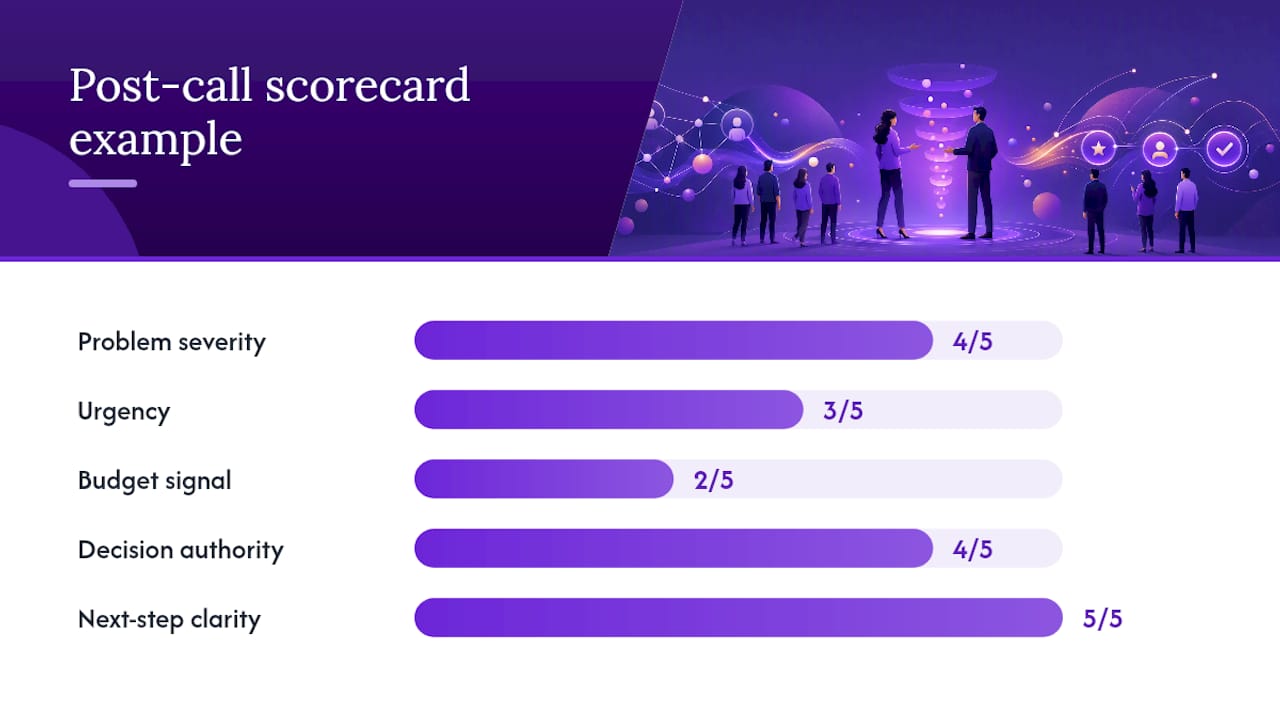
Paste the call transcript or your raw notes. Require a structured scorecard across five dimensions: problem severity, urgency, budget signal, decision authority, and mutual next-step clarity, each rated 1 to 5, plus one recommended next move.
Sample output: “Problem severity: 4. Urgency: 3. Budget signal: 2 (unconfirmed). Decision authority: 4 (VP on call). Next-step clarity: 5 (demo booked for Thursday). Recommendation: proceed to technical review, confirm budget owner before demo.”
4. Recap email prompt
Feed it the scored call notes and ask for a three-paragraph follow-up email: what was discussed, the agreed next step with a date, and one proof point relevant to the stated pain.
Sample output opens with something like: “Thanks for the time today, [Name]. To recap, you’re seeing reporting delays cost your team roughly a day per week during peak volume…” and closes with a specific calendar link and a case reference matched to their industry.
Pro Tip: Run the post-call scoring prompt within an hour of hanging up, while your notes still have context the transcript alone won’t capture. Scores logged the next day are noticeably less accurate.
The four prompts aren’t independent tools. Chained together, they turn a scattered process into a repeatable one, which is exactly the model behind a chained four-prompt discovery workflow that treats each output as the input for the next step.
How to Design Prompts That Don’t Waste Your Time
A weak prompt produces a rambling summary you have to edit anyway, which defeats the purpose. A strong prompt follows four rules, in this order:
- Role. Tell the model what it is. “Act as a sales coach reviewing a discovery call” produces sharper output than a bare question.
- Context. Give it the specifics: company, title, prior notes, industry. Vague input produces vague output every time.
- Structured output. Specify the exact fields or bullets you want back. Without this, you get prose you then have to parse manually.
- Rubric. For anything scored or judged, define the scale and what each number means. Otherwise a “4” from one rep means something different than a “4” from another.
Compare these two prompts side by side. Weak: “Tell me about this company and what to ask them.” Strong: “Act as a sales research analyst. Given this LinkedIn profile and company description, return a one-sentence pain hypothesis, three signal questions to test it, and one personal detail to reference in the first two minutes.” The second version gets used because it arrives in a form you can act on immediately, a distinction outlined clearly in guidance on avoiding common AI prompt failure modes.
Chaining works the same way a assembly line does. The pre-call prompt’s hypothesis becomes context for the in-call prompt. The in-call notes become the input for the post-call scorecard. The scorecard becomes the input for the recap email, so your follow-up language matches what you actually scored rather than a generic template. This sequencing is what separates a one-off prompt from an operational habit.
A few practical notes on running this live: keep the in-call tool in a separate window from your video call, muted from screen share, and never let it read anything back to the prospect verbatim. AI-generated follow-ups are suggestions, not scripts, so treat any hallucinated detail (a wrong title, a fabricated stat) as a red flag to verify before you say it out loud.
Pro Tip: Save your four prompts as reusable templates in whatever tool you use, not as one-off chat messages. A prompt you rebuild from memory every time drifts, and drift kills consistency across a team.
The Discovery Question Bank: What to Ask Live vs. Beforehand
You don’t need 40 questions memorized. You need the right nine live and the rest handled before the call ever starts. Reps who ask 11 to 15 questions on a 30-minute call outperform those who ask far more or far fewer, because cramming in every question on your list turns discovery into an interrogation instead of a conversation.
Here’s the bank, organized by category, with live questions marked:
- Current state. What does your process look like today? (async) Who’s involved in that workflow? (async) How long has it worked this way? (async)
- Pain. What’s not working about it? (live) What have you already tried? (live) What made you take this call today? (live, and the single highest-leverage question on the list, according to analysis of top-converting discovery calls, because it surfaces the actual trigger event rather than a generic complaint)
- Impact. What does this cost you in time or money each month? (live) Who else feels this pain across the team? (async) What happens if nothing changes in six months? (live)
- Goals. What does success look like in 90 days? (async) How will you measure it? (async)
- Decision process. Who else needs to sign off? (live) What’s your timeline for deciding? (async) Have you evaluated other options? (async)
- Budget and timing. Is there budget allocated already? (live) What’s driving the urgency now versus later? (live)
That’s nine live questions against roughly 31 that belong in async pre-call forms, emails, or discovery surveys. The goal isn’t fewer questions overall. It’s moving the factual, low-judgment ones out of your live minutes so you can spend that time on implication and decision-process questions that actually require a human reading a human.
Layer your follow-ups two or three levels deep instead of moving on after one answer. “What’s not working” gets an answer, then “what have you tried” digs one level further, then “what happened when you tried it” gets you to the real story. And after you ask “what made you take this call today,” stop talking. The pause does more qualifying work than your next question will.
Running the Call: A 30-Minute Script and Pre-Call Checklist
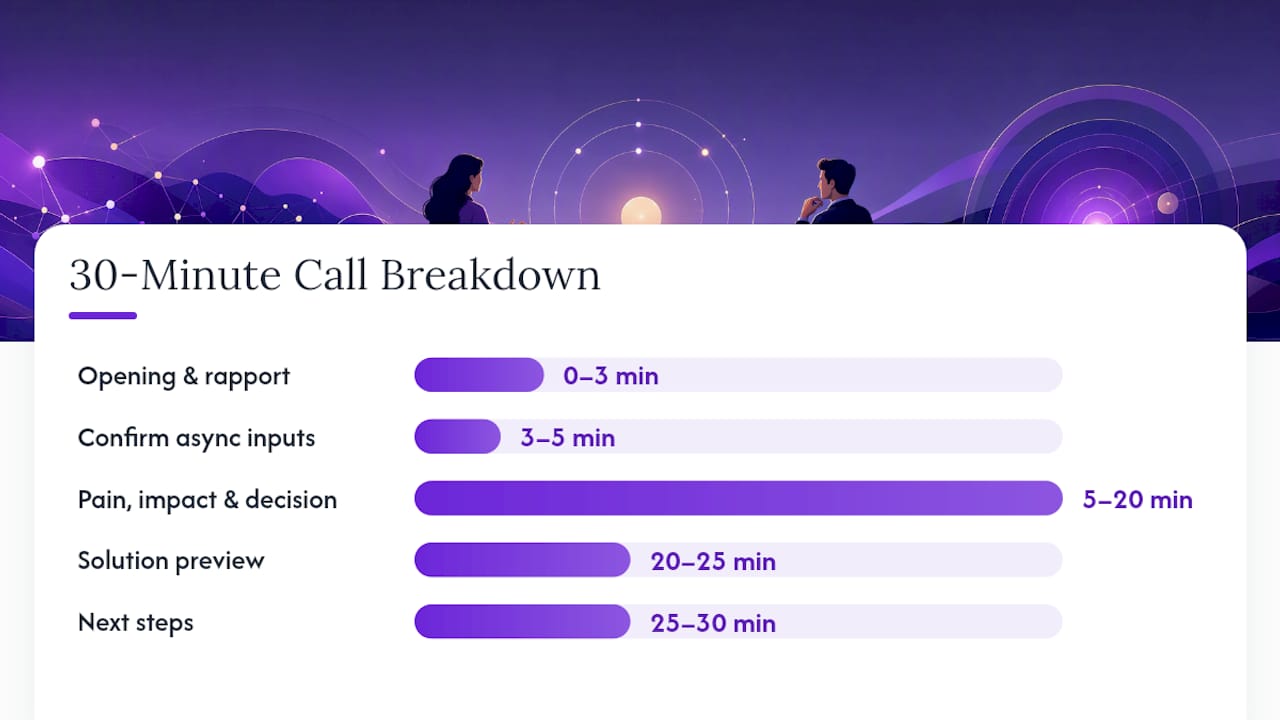
A discovery call runs better with a timed structure than with a mental list of questions you hope to remember. Here’s a workable breakdown, adapted from minute-by-minute discovery call templates:
- 0 to 3 minutes: Opening and rapport. Reference the recall trigger from your pre-call brief.
- 3 to 5 minutes: Confirm async inputs with a quick read-back (“You mentioned in your form that X, is that still accurate?”) rather than re-asking from scratch.
- 5 to 20 minutes: Pain, impact, and decision-process questions, using the live list above, following the person’s answers rather than rushing to the next item.
- 20 to 25 minutes: Solution preview, tied directly to the pain they named, not a generic pitch.
- 25 to 30 minutes: Next steps, with a date and a name attached, not “I’ll follow up soon.”
If you’re running long at minute 25 and haven’t covered decision process or budget, ask directly: “I want to respect your time. Before we wrap, who else needs to be involved in a decision like this?” One question beats none.
For enterprise deals, stretch this to 45 to 60 minutes and add a second stakeholder-mapping block, since multi-threaded deals need more than one voice on the first call.
Pre-call checklist, five items: company funding or news, the prospect’s title and tenure, any prior touchpoints (form fills, past emails), a competitor or alternative they may have already tried, and your working hypothesis from the AI research prompt.
Scoring the Call and Deciding What Happens Next
A five-dimension scorecard turns a subjective “that went well” into something you can act on and track over time.
- Problem severity (1–5): How painful is this, in their own words?
- Urgency (1–5): Is there a forcing event, or is this a someday project?
- Budget signal (1–5): Confirmed budget versus no mention at all.
- Decision authority (1–5): Is the person on the call the buyer, an influencer, or a gatekeeper?
- Next-step clarity (1–5): Did you leave with a date and a name, or a vague “let’s touch base”?
A combined score above 16 out of 25 usually justifies booking a demo immediately. A score in the 10 to 15 range calls for a technical review or a second stakeholder call before moving forward. Below 10, route the lead into a nurture sequence rather than burning calendar time on a deal that isn’t ready. Top-performing reps calibrate around 11 to 15 live questions per call largely because that volume gives enough signal to score accurately without overloading the conversation.
For your recap email, match language to the score. High urgency plus low budget clarity: “Before our next call, can you confirm who owns budget approval on your side?” Log every score in your CRM against rep name and week. Trends across ten calls tell you more about a rep’s discovery skill than any single call ever will.
How Live AI Coaching Fits Into the Discovery Workflow
The four prompts above work asynchronously, before and after the call. The harder moment is the middle fifteen minutes, when a prospect throws an objection you didn’t fully prep for and you have four seconds to respond before the silence gets awkward.
This is where real-time AI coaching tools fit into the workflow described above, not as a replacement for it. Such coaching listens to the live conversation and surfaces a suggested response the moment an objection lands, functioning as the in-call prompt generator running continuously instead of in a separate tab you have to check manually.
- It delivers instant objection responses during the call itself, rather than a follow-up you draft after the fact.
- Post-call scoring can mirror the five-dimension rubric above, so reps see where a call actually scored and where it slipped.
- Tracking talk ratio and scoring trends over time can help turn one-off scorecards into a coaching record.
For teams already running the pre-call and post-call prompts, adding live coaching is the natural next layer, covered in more detail in how AI coaching augments discovery calls.
Where Prompts Add the Most Leverage
Start with the pre-call research prompt and the post-call scoring prompt before touching anything live. Those two are low-risk, easy to review, and immediately improve consistency across a team. In-call tooling comes third, once reps trust the outputs from the first two.
Don’t let automation replace judgment; for example, a roofing lead-generation strategy call can help you frame customer-focused questions more effectively. A prompt output is a draft, not gospel, and a sales coach should spot-check scoring outputs weekly, the same instinct behind roleplay-based rep training. Track three numbers to know if any of this is working: conversion rate from discovery to next step, time between call and follow-up, and whether call scores trend upward across a rep’s pipeline over eight to ten weeks. If they don’t move, the prompts need revision, not abandonment.
— Ryan
Try the Prompts, Then Let CoachMode Handle the Live Moment
Everything above gets you a sharper call on paper: better research, better questions, better scoring. What it can’t do is help you when a prospect throws a curveball objection thirty seconds before you were planning to pitch. That’s the gap Getcoachmode’s live AI sales coaching closes: it listens in on Zoom, Google Meet, or Teams, and surfaces the right response the moment you need it, instead of leaving you to improvise.
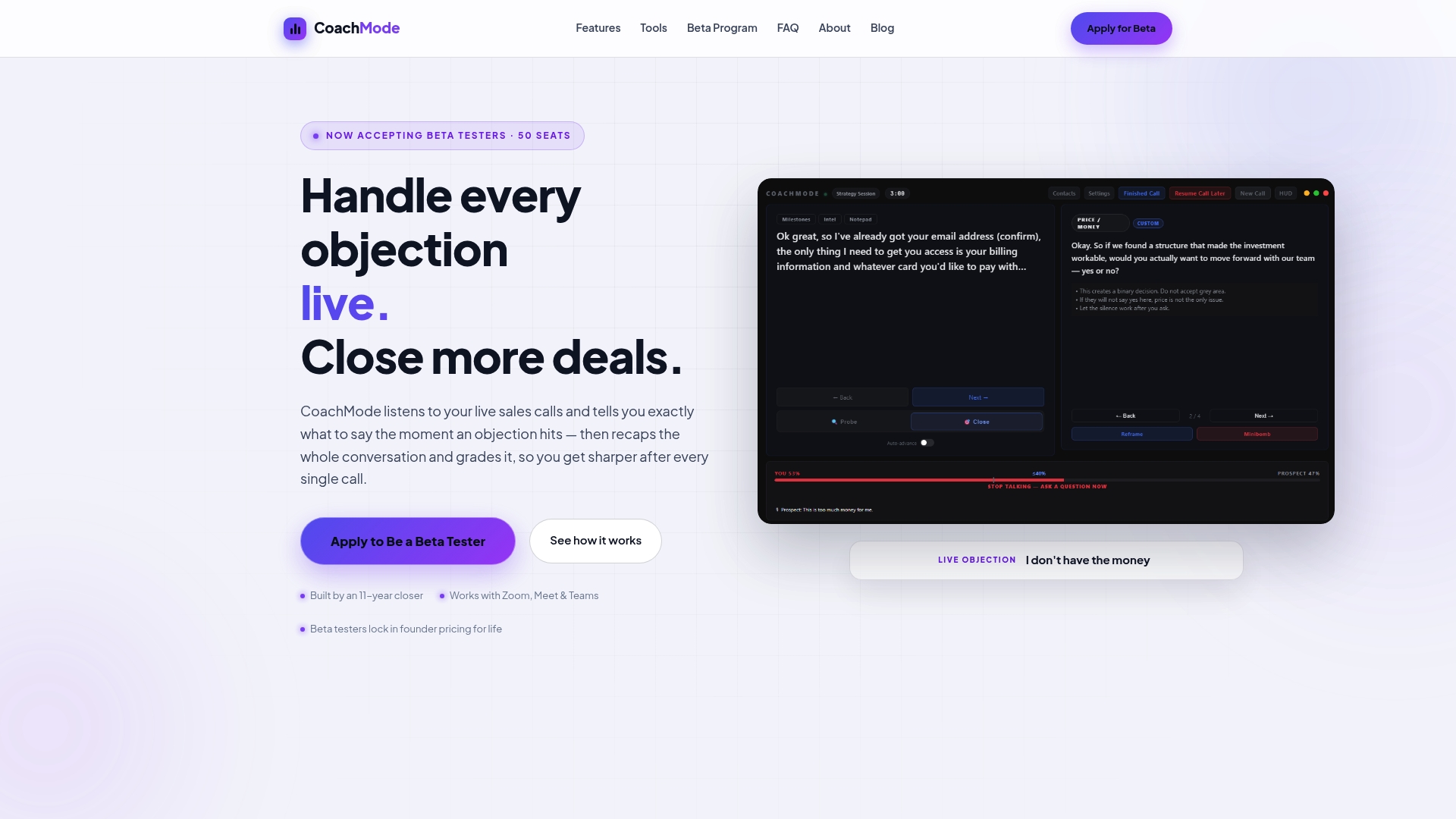
Visit the landing page to find a trial setup, a look at objection-response tooling in action, and a sample of the same five-dimension scorecard covered above, so you can see how a graded call looks before committing. If you’re running the prompt library from this article and want the in-call gap covered too, consider trying live coaching tools that work alongside your process.
Sources
Sales discovery questions, when to ask them, and AI prompts for discovery calls.
- AI Prompts for Discovery Calls: Pre-Call Research, Scoring, and Recap
- Sales Discovery Questions: 40 That Qualify, and When to Ask Them
- How to Run a Discovery Call: Script, Questions & Templates (2026)
- Discovery Call Questions: 30 Best for B2B Sales | Sendspark